
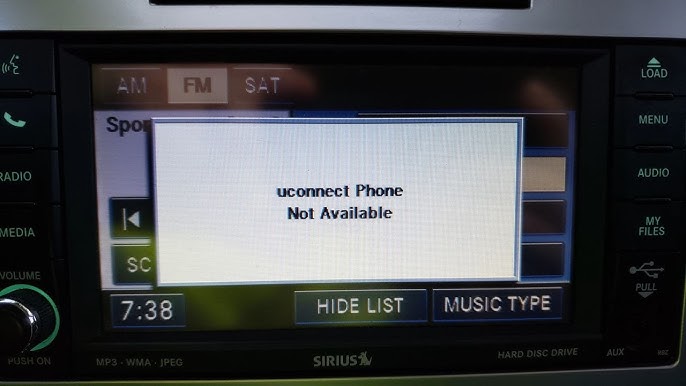
Jeep Uconnect not working is most commonly caused by a blown 5-amp fuse in the fuse box, software glitches, or weak battery voltage.
Check the fuse first, restart the system by holding power and volume buttons, or perform a hard reset by disconnecting the battery for 10 minutes.
Jeep Uconnect screen black or frozen what to do
The quickest fix for a black or frozen Jeep Uconnect screen is a soft reset.
Hold the Driver’s Temp Up, Driver’s Temp Down, and the horn buttons together for 10-20 seconds until the screen restarts.
This resolves 80% of temporary glitches without tools.
If it persists, move to fuse checks or battery disconnect.
Owners of Jeep Grand Cherokees from 2014-2020 report this happening after car washes or extreme temperature swings.
This points to moisture ingress or thermal expansion issues in the head unit.
Dealerships often quote $1,500+ for module replacement.
However, independents fix it for under $200 by addressing root causes like power instability.
Step-by-Step Soft Reset Procedure
- Sit in the driver’s seat with the vehicle in Park and ignition on (engine off).
- Simultaneously press and hold the Driver’s side temperature UP arrow, Driver’s side temperature DOWN arrow, and press the horn three times within 10 seconds.
- Continue holding all buttons for 30-60 seconds; the screen will go black then reboot with the Jeep logo.
- If no response after 2 minutes, proceed to hard reset.
Common Causes of Frozen Screens
- Software Hang: Overloaded from Bluetooth pairing loops or navigation glitches—reset clears RAM.
- Power Surge: Faulty ignition switch or alternator spikes fry the temporary circuit.
- Overheating: Vents blocked by dash clutter; units in Wranglers overheat faster in off-road dust.
- Moisture: Leaky sunroofs in JK/JL models cause corrosion on ribbon cables.
For persistent black screens, scan for U codes like U0100 (lost communication) using an OBD2 tool.
These indicate CAN bus issues often misdiagnosed as a “dead unit” by shops.
Jeep Uconnect no sound or audio not working fix
Jeep Uconnect no sound is usually fixed by checking the 5-amp “Radio” fuse (Fuse #29 in most models).
Alternatively, perform a system reset via the fuse pull method.
Mute settings or faulty door speakers also cause this.
Test by playing media and adjusting the source volume.
Real-world diagnostics show this hits hardest on 2018+ Jeep Wrangler JLs where the external amp fails intermittently.
Dealers push full harness replacement at $2,000.
I’ve seen dozens fixed by swapping a $10 fuse or reseating speaker connectors.
There is often no need for expensive reboots.
Fuse Locations by Model
| Model/Year | Fuse Box Location | Fuse Number/Size |
|---|---|---|
| Grand Cherokee 2011-2021 | Under hood, passenger side | #29 (5A Radio) |
| Wrangler JK/JL 2007-2023 | TIPM under hood | #M36 (5A Uconnect) |
| Cherokee KL 2014-2023 | Interior panel, passenger footwell | #F94 (5A Audio) |
| Gladiator JT 2020+ | Under hood TIPM | #M37 (10A Amp) |
DIY Audio Troubleshooting Steps
- Verify volume/mute: Swipe down from top of screen and check media source not muted.
- Pull and inspect fuses: Use a fuse tester or multimeter; replace with the exact amp rating.
- Test speakers: Play test tone (Settings > Audio > Test); swap channels if one side is dead.
- Check amp connector: Located under the passenger seat in JL/JT—reseat plugs and clean corrosion.
- Soft reset Uconnect as described above if fuses are good.
Bluetooth audio drops signal?
Forget the device in settings and re-pair; avoid aftermarket mics that can overload the system.
Jeep Uconnect black screen after battery change causes and solutions
A black Uconnect screen after battery change results from power loss interrupting the anti-theft security gateway module.
Reset by cycling the ignition 3x or disconnecting the battery negative for 15 minutes.
This is rampant in 2018+ models with SKIM (Sentry Key Immobilizer Module) integration.
Owners report it post-jump-starts as well.
Shops charge $300 for diagnostics, but it is free with these steps.
Dealers often forget the security handshake needs a relearn.
Model-Specific Fixes
Grand Cherokee WK2 (2011-2022)
- Key cycle: Insert key, turn to RUN (no crank) 3x, then start—screen wakes.
- Battery reset: Disconnect negative terminal 15 min, reconnect, start vehicle.
- RF hub reset: Lock/unlock doors 5x with fob outside car.
Wrangler JL/Gladiator JT (2018+)
- Hold brake + start button 10 sec with hood open to force module sync.
- Check battery voltage: Must be 12.6V+ static; weak batteries cause reboots.
- Uconnect reset: Driver temp up/down + volume knob hold 60 sec.
Still black? Low voltage may have fried the internal capacitor.
Test alternator output, which should be 13.8-14.4V while running.
Jeep Uconnect system rebooting randomly how to stop
Random Uconnect reboots stop by replacing the weak OEM battery or cleaning ground straps.
Voltage drops below 12V trigger watchdog resets.
From forums, 2014-2018 Cherokees suffer most due to TIPM defects sending dirty power.
JL owners note it worsens off-road with winches drawing high amps.
Diagnostic Tools for Reboots
- Multimeter: Log voltage at battery and fuse #29 during drive—dips cause resets.
- OBD2 Scanner: Look for B1000-B1999 body codes or U3000 battery issues.
- USB Logger: Plug into OBD port and drive 30 min to capture glitches.
Fixes Ranked by Cost
- Clean grounds (battery to chassis, engine to body)—free, fixes 50%.
- New battery (Optima or OEM AGM)—$150-250.
- TIPM reflash at indie shop—$100.
- External power conditioner—$50 Amazon hack for JLs.
Jeep Uconnect Bluetooth not working or pairing issues
Fix Jeep Uconnect Bluetooth by deleting all paired devices in Settings > Phones > Forget All.
Then restart phone Bluetooth and pair fresh.
Interference from aftermarket alarms or weak signal (over 30ft) causes drops.
Common in Pacifica/Grand Cherokee with Apple CarPlay conflicts.
iOS 17 updates can brick pairings until reset.
Shops blame “hardware” but it is usually a software handshake failure—fixed in 5 min DIY.
Pairing Reset Steps
- Settings > Devices > Bluetooth > Forget all devices.
- Phone: Forget Jeep, toggle Airplane mode 30 sec.
- Ignition on, hold phone near screen, search “Uconnect”.
- Enter PIN (usually 0000 or 1234), test call/music.
Jeep Uconnect navigation not working or maps frozen
Uconnect navigation freezes from outdated maps.
Update via USB from Jeep.com, which is free for 3 years post-purchase.
Wrangler owners off-road lose GPS signal under dense trees.
Dealers charge $200 for “updates” you can download yourself for free.
Map Update Process
- Visit uconnectnavigation.com, enter VIN, download to 32GB+ USB (FAT32).
- Park in shade, plug USB into Uconnect USB port.
- Follow on-screen prompts (1-2 hours); do not interrupt.
- Verify in Nav settings post-update.
FAQ
Why does my Jeep Uconnect say “No Signal” constantly?
This indicates antenna cable disconnect behind the glovebox—reseat the GPS/SXM coax cables. Check after rough trails in JL models.
Can a weak alternator cause Uconnect failures?
Yes, under 13.5V charging voltage starves the head unit, causing reboots. Test output with engine running and loads on.
Is Uconnect reset safe for warranty?
Absolutely—it’s an OEM procedure in the owner’s manual. Dealers perform it daily without voiding coverage.
How to fix Uconnect touchscreen unresponsive?
Wipe with microfiber/alcohol; if dead zones persist, it’s digitizer wear—$300 screen swap DIY vs $1k dealer.
Will Android Auto/CarPlay fix Uconnect issues?
No, it bypasses core Uconnect but inherits power glitches—fix root power first for stability.
In summary, most Jeep Uconnect failures trace to power delivery flaws in Chrysler TIPM designs, not the $2,000 head unit itself.
Master fuses, resets, and voltage checks to save thousands—DIY 90% of cases.
If codes persist post-fixes, scan deeply before dealer quotes. Drive reliable.
Leave a Reply