
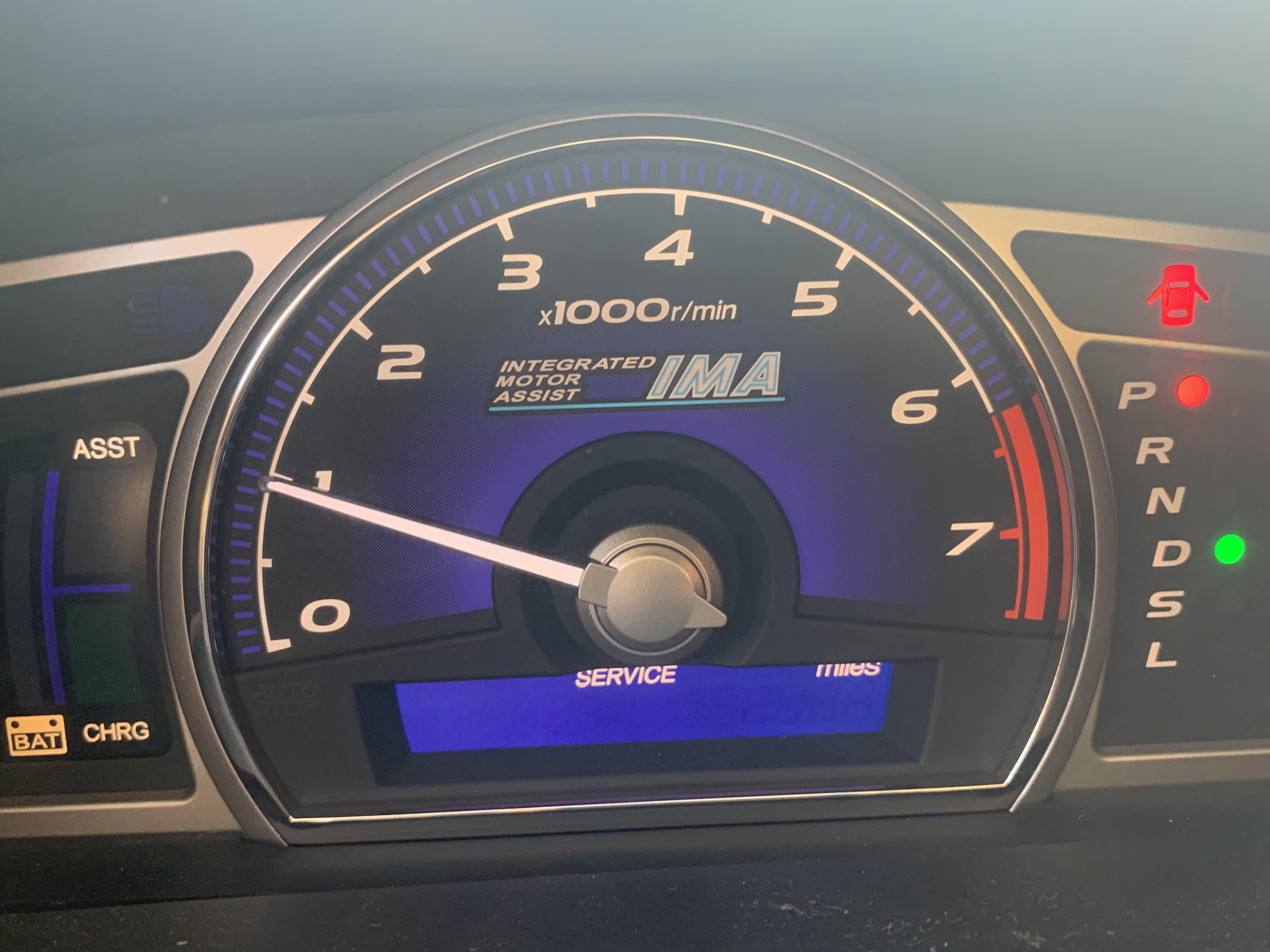
The Honda Civic mileage display not showing is most commonly caused by a failing instrument cluster LCD panel, a dimmer switch turned to its lowest setting, or a blown fuse. On 2006–2015 models, cracked solder joints on the cluster’s circuit board are a well-known defect that causes intermittent or complete display failure.
Why Is My Honda Civic Odometer and Trip Display Not Working?
The odometer and trip meter on your Honda Civic share the same LCD panel inside the instrument cluster. When that panel fails, you lose both readings at once.
Before you panic or assume the worst, check the simplest fix first: your dimmer knob.
The instrument panel brightness dial on the left side of the dash controls the cluster display intensity. If it is rotated fully counterclockwise, the display goes completely dark. Many owners mistake this for a broken cluster when the fix takes five seconds.
If the dimmer is not the issue, the problem almost always falls into one of these categories:
- ► Blown fuse — Fuse #9 (7.5A) in the interior fuse box powers the gauge cluster on most Civics.
- ► Loose or corroded cluster connector — The harness plug behind the instrument panel can back out over time.
- ► Cracked solder joints on the circuit board — Extremely common on 8th and 9th gen Civics.
- ► Degraded LCD panel — The LCD itself loses segments or goes blank entirely.
- ► Multiplex control unit fault — Rare, but it can suppress the display signal.
- ► Software glitch (10th and 11th gen) — A reset or firmware update fixes it.
How to Fix Honda Civic Mileage Display Not Showing — Model by Model
Different Civic generations have different failure patterns. What causes the display to die on a 2008 Civic is not the same as a 2022 Civic. Below is a generation-by-generation breakdown based on the most frequently reported problems from owners and technicians.
2006–2011 Honda Civic (8th Generation)
This generation is notorious for instrument cluster failures. Honda used lead-free solder on the circuit board, and those joints crack from years of heat cycling behind the dash.
Symptoms: Display flickers, goes dark intermittently, or stays blank permanently. Other gauges may also behave erratically.
Fixes:
- Check fuse #9 (7.5A) in the under-dash fuse box. Replace it if blown. If it blows again immediately, you have a short in the cluster wiring.
- Resolder the cluster board joints. Remove the instrument cluster (four screws, pull gently), open the housing, and reflow solder on the main connector pins and LCD ribbon cable contact points using a fine-tip soldering iron.
- Replace the LCD panel. Replacement LCD panels for the 8th gen cluster cost around $15–$30 online and are soldered directly to the board. This is a DIY job if you are comfortable with a soldering iron.
- Buy a remanufactured cluster. If resoldering fails, a reman unit runs $100–$200. You will need Honda to program the odometer reading to match your actual mileage.
If your 8th gen Civic’s cluster works fine on cold mornings but dies once the car warms up, that is a textbook cracked solder joint problem. Heat expands the joint and breaks the connection.
2012–2015 Honda Civic (9th Generation)
The 9th gen uses a more modern cluster with an integrated TFT or segmented LCD for the odometer area. The LCD itself degrades over time, losing contrast or displaying garbled characters.
Symptoms: Odometer numbers fade, show partial segments, or display random characters. The speedometer and tachometer still work fine.
Fixes:
- Verify the dimmer setting — rotate the brightness knob fully clockwise and confirm.
- Inspect fuse #9 and fuse #18 in the interior fuse box.
- Check the cluster ground wire. The ground point is on the driver-side kick panel. Remove it, sand off any corrosion, and reattach firmly.
- Replace the instrument cluster. On the 9th gen, the LCD is bonded to the board and is not easily replaceable by itself. A new OEM cluster from Honda costs $400–$600, but quality aftermarket remanufactured units are available for $150–$250.
2016–2021 Honda Civic (10th Generation)
The 10th gen Civic uses a fully digital TFT display for the driver information screen. Software glitches are the primary cause of display failures on these models, not hardware.
Symptoms: The digital display goes black, freezes on one screen, or shows an error message. The car otherwise runs normally.
Fixes:
- Perform a hard reset. Disconnect the negative battery terminal for 15 minutes. Reconnect and start the car. This clears temporary software faults in the body control module.
- Check for TSBs and software updates. Honda has issued service bulletins for display freezing on certain 2016–2019 models. A dealer can reflash the instrument cluster software at no cost if your car is under a TSB.
- Inspect the LVDS cable (the digital data cable connecting the main unit to the display). On some 10th gen models, this cable can loosen and cause intermittent blackouts. Reseating it fixes the issue.
- Replace the TFT display module if all else fails. This is a dealer-level repair typically costing $500–$800 parts and labor.
2022 and Newer Honda Civic (11th Generation)
The 11th gen uses a fully digital instrument cluster with software-driven rendering. Display issues are almost always software-related and fixable without hardware replacement.
Fixes:
- Reset the infotainment and cluster system. Hold the power button on the audio unit for 10 seconds until the system reboots. This also resets the cluster on many trims.
- Update the firmware. Use Honda’s over-the-air update system or visit the dealer for the latest software version.
- If the display is physically cracked or dead, the entire cluster must be replaced. Warranty should cover this on new vehicles.
How Much Does It Cost to Fix a Honda Civic Mileage Display?
Repair costs vary significantly depending on the generation and whether you go DIY or dealer.
Can I Still Drive My Honda Civic If the Mileage Display Is Not Showing?
Yes, you can drive the car safely. The odometer display is separate from the engine management system. The car runs normally, and all critical warning lights will still function.
However, there are two important things to keep in mind:
- ► Selling the vehicle — A non-functional odometer reading can raise red flags during a sale and may violate disclosure laws in your state.
- ► Warranty claims — If your Civic is under warranty, Honda may require a readable odometer for service eligibility.
Frequently Asked Questions
Does the Honda Civic odometer reading get stored in the ECU even if the display is off?
Yes. On 2006 and newer Civics, the mileage is stored in both the instrument cluster and the engine control unit.
Replacing the cluster does not erase the actual mileage. Honda dealers can reprogram the replacement cluster to display the correct reading.
Will disconnecting the battery reset my Honda Civic odometer to zero?
No. Disconnecting the battery does not reset the odometer on any modern Honda Civic. The mileage data is stored in non-volatile memory and persists through power loss.
Why does my Civic mileage display work sometimes but not other times?
Intermittent display failure on older Civics almost always points to cracked solder joints on the instrument cluster board. Temperature changes cause the cracks to open and close, making the display work when cold and fail when warm, or vice versa.
Can a bad alternator or low battery cause the mileage display to go blank?
Low voltage can cause the cluster to behave erratically, including blanking the display temporarily. If your display issue started alongside dimming headlights or slow cranking, have the charging system tested before blaming the cluster.
Is there a recall for the Honda Civic mileage display not working?
Honda has not issued a formal recall specifically for odometer display failure. However, there are Technical Service Bulletins (TSBs) for instrument cluster software issues on the 10th generation. Ask your dealer to check TSB 20-069 and any related bulletins for your model year.
Do Not Let a Dead Display Cost You a Dealership Markup
A blank mileage display on a Honda Civic is one of the most commonly misdiagnosed problems at dealerships. Shops routinely quote $600–$900 for a full cluster replacement when a $15 solder job or a simple fuse swap is all that is needed.
Start with the dimmer knob, check the fuse, and then move to the cluster itself. For 8th and 9th gen owners, learning to resolder those joints will save you hundreds of dollars and give you a cluster that lasts for years.
For 10th and 11th gen owners, a battery reset and software update solves the problem in the majority of cases. Know your generation, know the failure point, and you will fix this the right way the first time.
Leave a Reply