
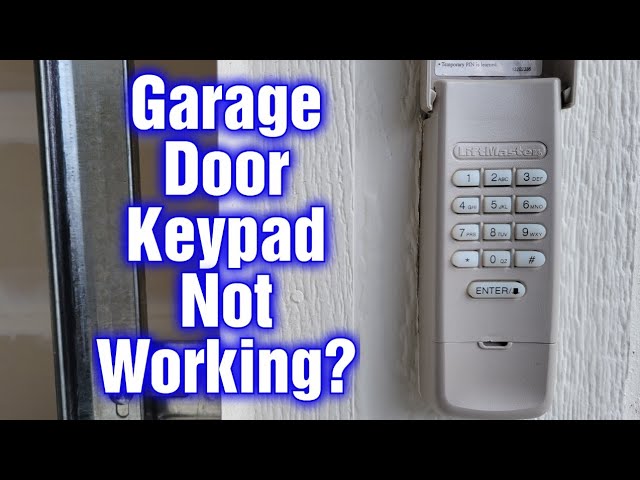
If your LiftMaster keypad is not working, the most common fixes are: replace the batteries, reprogram the keypad to the opener using the learn button, make sure the lock feature on your wall console is not activated, and check for water damage or corroded battery contacts inside the keypad housing.
Why Is My LiftMaster Keypad Not Working?
A LiftMaster keypad stops working due to dead batteries, a lost programmed code, the lock feature being engaged on the wall console, corroded internal contacts, water or sun damage to the keypad membrane, or interference from LED light bulbs in the garage opener.
After diagnosing hundreds of LiftMaster keypads over the years, I can tell you that roughly 70 percent of “broken” keypads are not broken at all. The problem is almost always something simple that owners overlook or something that was caused by a previous repair attempt.
Before you spend money on a replacement, walk through every cause below systematically. The remaining 30 percent involve internal board failures, membrane degradation from UV exposure, or a lockout condition on the opener itself.
Understanding the full picture saves you time, money, and unnecessary frustration.
The Lock Feature Is Turned On
This is the single most misdiagnosed issue I see. LiftMaster wall consoles have a lock button that disables all remote signals, including the keypad.
If that light is on, no wireless device will work. Follow these steps to check your console:
- ➤ Go to your wall-mounted control panel inside the garage.
- ➤ Look for a button labeled “Lock” or an indicator light that is solid or blinking.
- ➤ Press and hold the lock button for about 2 to 3 seconds until the light turns off.
- ➤ Try the keypad again immediately.
Dealers and even some technicians will quote you a full keypad replacement when the lock button was simply pressed accidentally. This often happens by kids or while cleaning the wall unit.
Dead or Weak Batteries
LiftMaster keypads run on a 9-volt battery. Most owners forget these exist until the keypad goes dark.
Even if the keypad lights up faintly, a weak battery may not provide enough power to send the signal to the opener.
- Slide the keypad cover down or unscrew the battery compartment on the back of the unit.
- Remove the old 9-volt battery and inspect the contacts for white or green corrosion.
- Clean corroded contacts with a cotton swab dipped in white vinegar, then dry thoroughly.
- Install a fresh 9-volt alkaline battery. Avoid dollar-store batteries; they drain fast in outdoor temperature swings.
- Reprogram the keypad code after a battery change. On most models, the stored code can be lost when the battery is fully dead.
How Do I Reprogram a LiftMaster Keypad?
To reprogram a LiftMaster keypad, press and hold the programmed PIN on the keypad, then press and hold the Enter button. While holding both, go to the motor unit and press the yellow Learn button once. The opener light will blink, confirming the keypad is synced.
There are slightly different sequences depending on whether you have an older DIP-switch model or a newer Security+ 2.0 model. I will break this down by system type below.
Reprogramming Security+ 2.0 Keypads (Yellow Learn Button)
This applies to most LiftMaster openers manufactured after 2011 with a yellow learn button on the motor unit.
- On the keypad, enter your desired 4-digit PIN.
- Press and hold the Enter button.
- While still holding Enter, press and release the yellow Learn button on the motor unit.
- The opener lights will flash, or you will hear two clicks.
- Release the Enter button on the keypad and test the door.
Reprogramming Security+ Keypads (Purple or Red/Orange Learn Button)
For openers with a purple or red/orange learn button, the sequence is slightly different.
- Enter your 4-digit PIN on the keypad.
- Press and hold the Enter button.
- Press and release the learn button on the motor unit.
- Wait for the opener lights to flash or click, then release Enter and test.
Older DIP-Switch Models (Pre-2005)
If your opener or keypad uses small physical DIP switches, you must match the switch positions inside the keypad to the switch positions inside the remote or motor unit.
- Open the keypad battery compartment to expose the DIP switches.
- Open your existing remote or the motor unit cover to see its DIP switch pattern.
- Match every switch position exactly using a small screwdriver or fingertip.
If you are unsure which learn button color your opener has, look at the back or side of the motor unit hanging from the ceiling. The learn button is a small square button near the antenna wire. The color tells you which generation of Security+ your system uses.
What Causes a LiftMaster Keypad to Stop Working After Battery Replacement?
A LiftMaster keypad loses its programmed code when the battery is fully drained or removed for too long. After replacing the battery, you must reprogram the PIN and re-sync the keypad to the opener using the Learn button.
This is normal behavior, not a defect. Many owners assume a new battery alone should restore function.
On most Security+ models, the keypad retains memory for only a short window without power. Always reprogram after a battery swap.
Keypad Still Not Working After Reprogramming
If you have replaced the battery and reprogrammed the keypad but it still does not work, check these additional causes:
- ✔ LED light bulb interference: LED bulbs in the opener motor unit emit radio frequency noise that blocks the keypad signal.
- ✔ Antenna position: The wire antenna on the motor unit must hang straight down. If it is coiled or damaged, signal reception drops.
- ✔ Distance: If you recently moved the keypad farther from the door, the signal may be blocked.
- ✔ Multiple openers: If you have two openers, make sure you are programming the keypad to the correct unit.
LiftMaster Keypad Not Working in Cold Weather or After Rain
Cold weather and moisture are the two biggest enemies of LiftMaster exterior keypads. Freezing temperatures stiffen the rubber membrane, making buttons unresponsive.
Moisture seeps into the housing and corrodes the circuit board and battery contacts. This can lead to permanent failure if not addressed quickly.
Cold Weather Fixes
- ❄ Press buttons firmly and hold for a full second. In freezing conditions, the membrane needs more pressure.
- ❄ Warm the keypad briefly with your hand before entering the code.
- ❄ Install a small protective cover or shield above the keypad to reduce direct cold exposure.
- ❄ If the problem happens every winter, remove the keypad, dry it indoors, and reseal the housing with silicone.
Water Damage and Moisture Intrusion
LiftMaster keypads are rated for outdoor use, but they are not fully waterproof. Over time, the rubber gasket around the battery door and the plastic housing seams degrade.
- Remove the keypad from the wall mounting bracket.
- Open the battery compartment and remove the battery.
- Inspect the circuit board for green or white corrosion.
- Clean the board gently with isopropyl alcohol (90 percent or higher) and a soft brush.
- Let everything dry for at least one hour before remounting.
LiftMaster Keypad Not Working by Model
Different LiftMaster keypad models have slightly different troubleshooting steps. The 877LM, 878MAX, and 877MAX are the most common models.
LiftMaster 877LM Wireless Keypad
Uses Security+ with a 9-volt battery. Reset by holding the “*” and “#” buttons simultaneously until the keypad lights stop flashing. Known issue: the membrane degrades faster in direct sunlight.
LiftMaster 878MAX Wireless Keypad
Uses Security+ 2.0 with one-button programming. Reset by holding the Enter button until the backlight flashes four times. Known issue: some units manufactured before 2016 have firmware bugs.
LiftMaster 877MAX Wireless Keypad
Compatible with Security+ 2.0, Security+, and Billion Code systems. Has a switch inside the battery compartment to toggle between modes. Ensure the switch matches your opener generation.
How to Reset a LiftMaster Keypad to Factory Settings
To factory reset most LiftMaster keypads, press and hold the asterisk (*) and pound (#) keys together until the keypad backlight flashes and goes dark.
A factory reset is the nuclear option when nothing else works. It wipes every stored opener association from the keypad memory.
- Locate the keypad and press and hold the asterisk (*) and pound (#) keys simultaneously.
- Hold until the keypad backlight blinks and then goes completely dark (about 5 to 10 seconds).
- Enter your new 4-digit PIN and press Enter.
- Go to the motor unit and press the Learn button within 30 seconds.
- Wait for the opener light to flash, confirming the new code is accepted.
When Should You Replace Your LiftMaster Keypad?
Replace your LiftMaster keypad if the membrane is physically cracked, if the circuit board shows heavy corrosion, or if the unit is over 10 years old and experiencing random failures.
A new LiftMaster 878MAX keypad costs between 30 and 50 dollars and takes about 10 minutes to program. Do not pay a dealership or locksmith over 100 dollars for this job unless you are uncomfortable doing it yourself.
Signs Your Keypad Is Beyond Repair
- ✘ Buttons do not register even after cleaning and battery replacement.
- ✘ The LED backlight is completely dead with a brand-new battery.
- ✘ The keypad works intermittently and resets randomly.
- ✘ Visible burn marks or melted plastic on the circuit board.
Frequently Asked Questions
Can I use a LiftMaster keypad with a Chamberlain opener?
Yes. LiftMaster and Chamberlain are manufactured by the same parent company. Most LiftMaster keypads are cross-compatible if the learn button color matches.
Why does my LiftMaster keypad light up but not open the door?
This usually means the keypad needs to be reprogrammed via the Learn button, or the lock feature on the wall console is activated. Reprogram the keypad first, then check the wall console lock.
How long does a LiftMaster keypad battery last?
A standard 9-volt alkaline battery typically lasts 12 to 24 months. Extreme heat and cold shorten battery life, so replace it proactively once a year.
Can I program two garage doors to one LiftMaster keypad?
Yes. On the 878MAX and 877MAX, you can assign different PINs to up to two doors. Consult your manual for the dual-door programming sequence.
Conclusion
A LiftMaster keypad that stops working is almost always a fixable problem without replacing the entire unit. Start with the simplest causes first: check the lock button on your wall console, replace the battery, and reprogram the keypad.
If the issue persists, inspect for water damage, LED interference, and membrane degradation. Each LiftMaster keypad model has its own quirks, so match your troubleshooting to the specific model you own.
With the step-by-step approach outlined above, you can diagnose and fix the problem yourself in under 15 minutes. This helps you avoid paying for unnecessary repairs or replacements.
Leave a Reply