
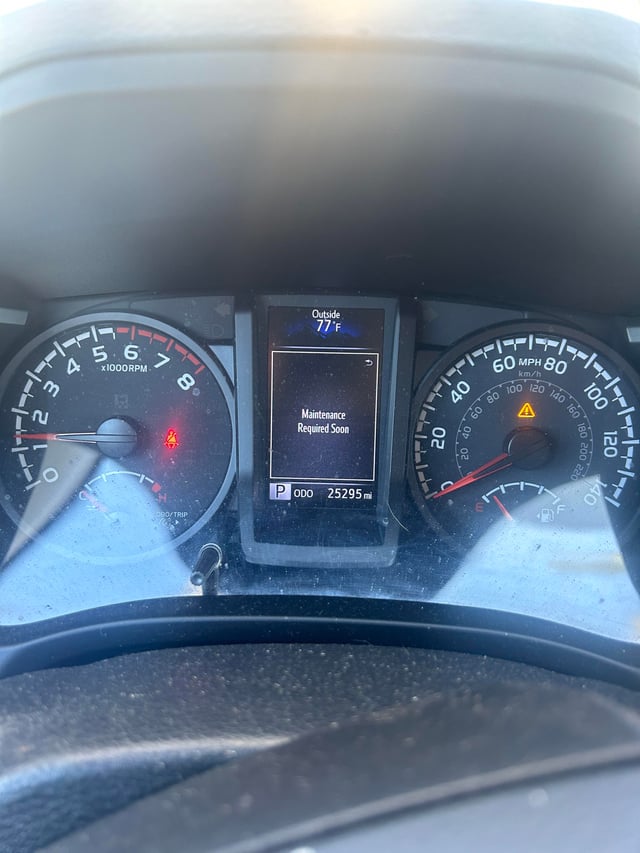
The “Maintenance Required Soon” light on your Toyota is a pre-programmed reminder based on mileage intervals, not an actual diagnostic fault code. It signals that your next scheduled service (like an oil change or tire rotation) is approaching, typically 5,000 miles since the last reset.
This light is separate from the check engine light and will not cause a failure to start or limp mode. However, ignoring it means you might miss critical maintenance, which can lead to real problems down the road.
The reset procedure is simple and varies by model, and you can do it yourself in under a minute.
What does the “Maintenance Required Soon” light mean on a Toyota?
This light is a timed/mileage-based reminder set by the manufacturer. It illuminates after approximately 4,500 to 5,000 miles since the last maintenance reset.
It is not detecting a current engine or mechanical problem like the check engine light (CEL) does.
The system is designed to ensure owners adhere to the recommended service schedule. Toyota technicians reset this light after completing a standard service.
If you perform your own oil changes or tire rotations, you must manually reset this counter, or the light will continue to remind you unnecessarily.
Key Differences: Maintenance Light vs. Check Engine Light
| Criteria | Maintenance Light | Check Engine Light |
|---|---|---|
| Color & Symbol | Usually an orange or yellow wrench icon. | An orange or yellow engine-shaped icon. |
| Meaning | Scheduled service reminder. | The vehicle’s computer has detected an emission or drivetrain fault. |
| Action | You can safely drive to your next service interval. | Requires diagnosis. |
How do I reset the “Maintenance Required Soon” light on my Toyota?
The reset method depends on your Toyota’s model year and instrument cluster design. The most common method involves using the trip odometer button and the ignition.
Always attempt this with the engine off.
Standard Reset for Most Toyota Models (2005-2020+)
- Turn the ignition to the “ON” position, but do not start the engine. For push-button start, press the button twice without pressing the brake pedal.
- Ensure the odometer/Trip A display is showing. If not, press the trip button to cycle to it.
- Turn the ignition to the “OFF” position.
- Press and hold the trip odometer reset button.
- While still holding the button, turn the ignition back to the “ON” position.
- Continue holding the button for about 5-10 seconds. The light will flash, turn off, and the maintenance counter will reset.
- Release the button. The light should remain off.
Reset for Newer Toyota Models with Multi-Information Display (MID)
- Use the steering wheel controls to navigate to the “Settings” or “Vehicle” menu in the MID.
- Find the “Maintenance” or “Service” section.
- Select the option to “Reset” or “Reset Data.”
- Confirm the reset when prompted.
Model-Specific Notes
- ▸ Toyota Camry/Corolla (2018+): Often uses the MID method via steering wheel buttons.
- ▸ Toyota RAV4/Highlander (2019+): Typically requires the trip odometer button method even with a digital dash. Consult your owner’s manual for the exact button sequence.
- ▸ Older Toyota Tacoma/Tundra (Pre-2010): May have a dedicated “Maintenance Reset” button near the gauges that you simply press and hold with the ignition on.
Why won’t the “Maintenance Required Soon” light reset?
If you’ve followed the procedure and the light won’t reset or comes back on immediately, there’s likely a user error in the sequence. The timing and exact steps are critical.
Common Reset Failures and Fixes
- Holding the Button at the Wrong Time: You must press and hold the trip button before turning the ignition on, and hold it continuously through the reset. Do not press it after turning the key on.
- Incorrect Display Active: Ensure the display is on the primary odometer or Trip A, not Trip B or another menu. The system only resets from that default view.
- Insufficient Hold Time: Hold the button for a full 10-15 seconds after the light flashes. Some owners release too early.
- Actual Maintenance Still Due: If you only rotate tires but the system expects an oil change, the light may reset but come back on at a shorter interval (e.g., 3,000 miles). Reset it after completing all required items for that interval.
🔧 Pro Tip: If you are stuck, disconnect the negative battery terminal for 5-10 minutes. This can clear the memory of some older systems. Reconnect and attempt the reset procedure again.
Can I ignore the “Maintenance Required Soon” light?
Ignoring this light is not recommended. While it won’t cause immediate drivability issues, it serves as your only reminder for critical scheduled maintenance.
Overlooking services like oil changes, filter replacements, and tire rotations will shorten the life of your vehicle.
Neglected oil changes lead to sludge buildup, reduced lubrication, and eventual engine wear. Skipping tire rotations causes uneven tread wear, leading to premature tire replacement and compromised handling. Use the light as a tool to stay on schedule.
FAQ
Does the maintenance light come on when the car is due for an oil change?
Yes, for most Toyota models, the primary trigger for the “Maintenance Required Soon” light is the oil change interval. It is programmed to illuminate every 5,000 miles (or 10,000 miles for newer models using synthetic oil, as specified in your manual).
Will the maintenance light fail a state inspection?
No, the maintenance required light is not an emissions system fault and will not cause a failure during a state safety or emissions inspection. Only the check engine light, or other malfunction indicator lamps (MILs), can cause inspection failure.
I just bought a used Toyota and the light is on. How do I know when it was last serviced?
You cannot determine the last service date from the light itself. It only indicates mileage since the last reset. Your best course of action is to perform a full service (oil change, filter check, tire rotation) and reset the light to establish a new baseline.
Is there a difference between “Maintenance Required Soon” and “Maintenance Required”?
On some older Toyota models, “Maintenance Required” might indicate the service interval has already passed (0 miles remaining), while “Soon” indicates it is approaching (e.g., 500 miles remaining). The reset procedure is the same for both.
Stay Proactive, Not Reactive
Think of the “Maintenance Required Soon” light as your Toyota’s built-in service manager. It’s a simple, mileage-based timer designed to protect your investment.
By learning the correct reset procedure for your model and adhering to the schedule it reminds you of, you take full control of your vehicle’s longevity. Treat it as a helpful nudge, not a warning, and you’ll avoid the costly repairs that come from true neglect.
Leave a Reply