
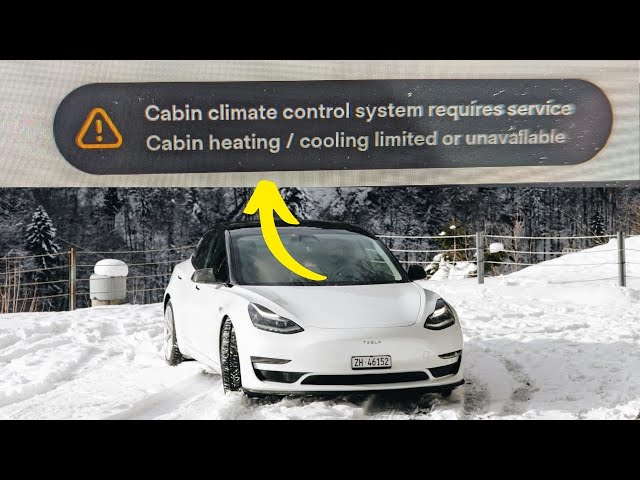
The “Cabin Climate Control System Requires Service” alert on a Tesla means the HVAC system has detected a fault in the thermal management components, most commonly a failing compressor, low refrigerant, a faulty superbottle (octovalve), a defective PTC heater, or a cabin temperature sensor error. In many cases, it’s a software glitch that can be resolved with a hard reset, but persistent alerts require physical diagnosis of the HVAC compressor, refrigerant levels, or thermal control valves.
What Does “Cabin Climate Control System Requires Service” Mean on a Tesla?
This alert triggers when Tesla’s onboard diagnostics detect an anomaly in the HVAC or thermal management system. The car’s computer monitors refrigerant pressure, compressor speed, cabin sensor readings, and valve positions in real time. When a reading falls outside its expected range, the system disables climate control to prevent further damage and throws this warning on the touchscreen.
Unlike traditional vehicles where climate control is a relatively simple loop of compressor, condenser, and evaporator, Tesla uses an integrated thermal management system that cools the battery, powertrain, and cabin through a shared loop. A single point of failure can cascade into multiple system warnings.
The severity ranges from a harmless software hiccup to a compressor that has seized internally. The critical thing is not to ignore it, because if the thermal management system is genuinely compromised, your battery can overheat during Supercharging or spirited driving.
What Causes the Tesla Cabin Climate Control System to Fail?
The most frequent causes are HVAC compressor degradation, refrigerant leaks, octovalve or superbottle valve malfunctions, PTC heater element failure, cabin temperature sensor errors, or a dirty cabin air filter triggering abnormal airflow readings. Each cause has distinct symptoms and diagnostic paths.
1. HVAC Compressor Failure
The electric scroll compressor used in all Tesla models is a high-voltage component that operates at up to 400V. Over time, internal bearing wear causes a grinding or whining noise from the front of the car. On Model S and Model X vehicles built between 2016 and 2019, compressor failure is extremely common once mileage exceeds 80,000 to 100,000 miles.
You can sometimes catch a failing compressor before it fully dies. If you hear a high-pitched whine when the AC kicks on, or if the AC blows warm air intermittently while the compressor cycles erratically, the unit is on its way out. A compressor that has seized completely will trigger the service alert immediately and often throw a high-voltage isolation fault alongside it.
2. Low Refrigerant or Refrigerant Leaks
Tesla uses R-134a refrigerant in most models and R-1234yf in newer builds. A slow leak from a Schrader valve, evaporator core, or condenser fitting will gradually drop system pressure below the threshold that triggers the alert.
Unlike a traditional car, you cannot simply top off refrigerant on a Tesla yourself. The system requires vacuum evacuation and a precise charge by weight, typically around 600 to 800 grams depending on model.
3. Octovalve or Superbottle Malfunction
The Model 3 and Model Y use an octovalve (also called a superbottle in earlier iterations) that directs coolant flow between the battery, powertrain, and cabin circuits. If a valve motor fails or a position sensor reads incorrectly, the system cannot route heat or cooling where it needs to go. This is one of the more expensive repairs because the octovalve sits deep in the front trunk area and labor time is significant.
4. PTC Heater Element Failure
Tesla vehicles use high-voltage PTC (Positive Temperature Coefficient) heaters to warm the cabin and battery in cold weather. When a PTC element degrades or its control board fails, the system detects abnormal resistance or current draw and flags the climate control as requiring service. This is especially common in regions with harsh winters where the heater works overtime for months.
5. Faulty Cabin Temperature Sensors
Multiple sensors inside the cabin feed data to the climate control module. If a sunload sensor, ambient sensor, or interior thermistor reads out of range, the system may interpret it as a climate control fault. A common trick is that direct sunlight hitting the dashboard sensor for an extended period can occasionally cause a false reading, though this usually clears on its own.
6. Software Glitches
Tesla’s HVAC system is heavily software-managed. Firmware bugs, incomplete over-the-air updates, or a corrupted HVAC configuration file can trigger the warning with no actual hardware fault present. This is the most benign cause and usually resolves with a reboot or a software reinstall pushed through a service visit.
How to Reset or Troubleshoot the Tesla Climate Control System at Home
Before scheduling a service appointment, there are several steps you can take to rule out a software glitch or minor issue that does not require professional repair.
Step 1: Perform a Soft Reset
Hold both scroll wheels on the steering wheel until the touchscreen goes black and the Tesla logo appears. This reboots the infotainment computer and can clear transient HVAC faults. Wait for the system to fully restart and check if the alert returns within 10 to 15 minutes of driving.
Step 2: Perform a Full Power Cycle
If the soft reset does not help, power off the vehicle completely through the touchscreen under Controls, Safety, Power Off. Wait at least five minutes without touching any doors or pedals.
Then press the brake pedal to wake the car. This allows all vehicle modules, including the HVAC controller, to fully reset.
Step 3: Check the Cabin Air Filter
A severely clogged cabin air filter can cause restricted airflow that confuses the climate control sensors. On Model 3 and Model Y, the filter is located behind a panel in the passenger footwell.
Replace it if it has not been changed in the last 12 months or 15,000 miles. On Model S and Model X, the filter sits behind the frunk liner and is similarly accessible.
Step 4: Inspect for Visible Coolant Leaks
Pop the frunk and look for pink or orange coolant pooling under the front of the car or around the octovalve housing. Any visible leak means you need professional service and should not continue driving the vehicle, as coolant loss affects both cabin HVAC and battery thermal protection.
Tesla Model-Specific Climate Control Issues and Fixes
Model S and Model X (Pre-2021)
These vehicles are the most prone to compressor failure. The earlier scroll compressors have a known service life, and Tesla eventually revised the part.
If your Model S or X is out of warranty, expect to pay between $2,000 and $3,500 for a compressor replacement at a dealership. Independent EV shops can often do it for $1,200 to $2,000 using OEM or remanufactured compressors.
The PTC heater in older Model S units is also a known weak point. Replacing it requires dropping the front undertray and working with high-voltage connections, so this is not a safe DIY job for most owners.
Model 3 and Model Y
The octovalve is the primary failure point on these platforms. Symptoms include the AC working on one side but not the other, the heater producing lukewarm air despite full temperature setting, or the battery taking unusually long to precondition for Supercharging. The octovalve replacement cost at Tesla service ranges from $800 to $1,500 depending on labor rates in your area.
Another Model 3 and Model Y specific issue is the rear evaporator leaking on certain 2019 and 2020 builds. If you notice a sweet chemical smell inside the cabin or oily residue on the rear HVAC vents, have the evaporator inspected.
Cybertruck
Early Cybertruck deliveries have reported intermittent climate control alerts tied to software calibration issues with the new heat pump system. Tesla has been addressing these through over-the-air updates. If you own an early build Cybertruck and see this alert, ensure your software is fully updated before visiting service.
Common Misdiagnosis at Dealerships and Shops
One of the most frequent mistakes both Tesla service centers and independent shops make is replacing the entire compressor when the actual fault is a $15 refrigerant pressure sensor. The pressure sensor sits on the refrigerant line and can throw readings that mimic a compressor failure. Always ask to see the diagnostic trouble codes before authorizing an expensive repair.
Another common misdiagnosis is blaming the octovalve when the real issue is air trapped in the coolant circuit. After a coolant flush or any thermal system service, air pockets can form and cause erratic valve behavior. A proper bleed procedure using Tesla’s service mode or a vacuum fill tool often resolves this without any part replacement.
Shops unfamiliar with Tesla may also quote a full HVAC system overhaul when a software reinstall would fix the problem. Tesla service centers can remotely push firmware or perform a targeted HVAC module reinstall at minimal cost.
Cost of Repair for Tesla Climate Control System
| Repair | Tesla Service Cost | Independent Shop Cost |
|---|---|---|
| HVAC Compressor Replacement | $2,000 – $3,500 | $1,200 – $2,000 |
| Octovalve Replacement | $800 – $1,500 | $600 – $1,100 |
| PTC Heater Replacement | $1,500 – $2,500 | $1,000 – $1,800 |
| Refrigerant Leak Repair and Recharge | $400 – $800 | $250 – $500 |
| Cabin Air Filter Replacement | $60 – $100 | $30 – $50 (DIY) |
| Software Reinstall / HVAC Recalibration | $0 – $150 | Usually not available |
How to Prevent Tesla Climate Control System Failures
- Replace the cabin air filter every 12 months or 15,000 miles, whichever comes first. A clogged filter stresses the blower motor and confuses airflow sensors.
- Keep your software updated. Tesla frequently patches HVAC-related firmware bugs through over-the-air updates.
- Do not ignore unusual noises from the front of the car. A whining, grinding, or clicking sound during AC operation almost always indicates compressor wear that will worsen over time.
- Schedule a thermal system inspection every two years if you are out of warranty. A technician can check refrigerant levels, coolant condition, and valve operation before small issues become expensive failures.
- Avoid running the AC on maximum immediately after a cold start in extreme heat. Let the system cycle for 30 seconds before ramping to full. This reduces compressor shock load.
Frequently Asked Questions
Can I drive my Tesla with the cabin climate control service warning active?
You can drive short distances, but be aware that the same thermal management system also protects the battery. If the warning persists, avoid hard acceleration, extended highway driving, and Supercharging until the system is diagnosed. Overheating the battery without proper thermal management can cause permanent cell degradation.
Does Tesla warranty cover the cabin climate control system?
Yes, under the New Vehicle Limited Warranty, the HVAC system is covered for 4 years or 50,000 miles. The battery and drivetrain warranty extends to 8 years or 100,000 to 150,000 miles depending on model, but HVAC components are not included in the longer warranty unless a battery thermal fault is the root cause.
Why does the climate control warning appear only in cold weather?
Cold weather increases the load on the PTC heater and heat pump system. A weak PTC element or low refrigerant that works fine in mild conditions will fail under the higher demand of winter operation. The system is also more sensitive to sensor drift when temperatures are extreme.
Can a Tesla mobile service technician fix the climate control system?
Mobile service can handle software reinstalls, cabin filter replacements, and minor sensor diagnostics. However, compressor replacement, octovalve replacement, and refrigerant work require a service center with a lift and proper refrigerant recovery equipment.
Take Action Before It Gets Worse
The cabin climate control service warning on a Tesla should never be dismissed as just an inconvenience. In most cases, it is an early warning that allows you to catch a failing component before it cascades into a more expensive repair.
Start with the free troubleshooting steps like a reboot and filter check, and if the alert returns, get a proper diagnostic scan before any shop starts replacing parts. Understanding what the alert actually means saves you from unnecessary repair bills and keeps your Tesla running the way it should.
Leave a Reply