
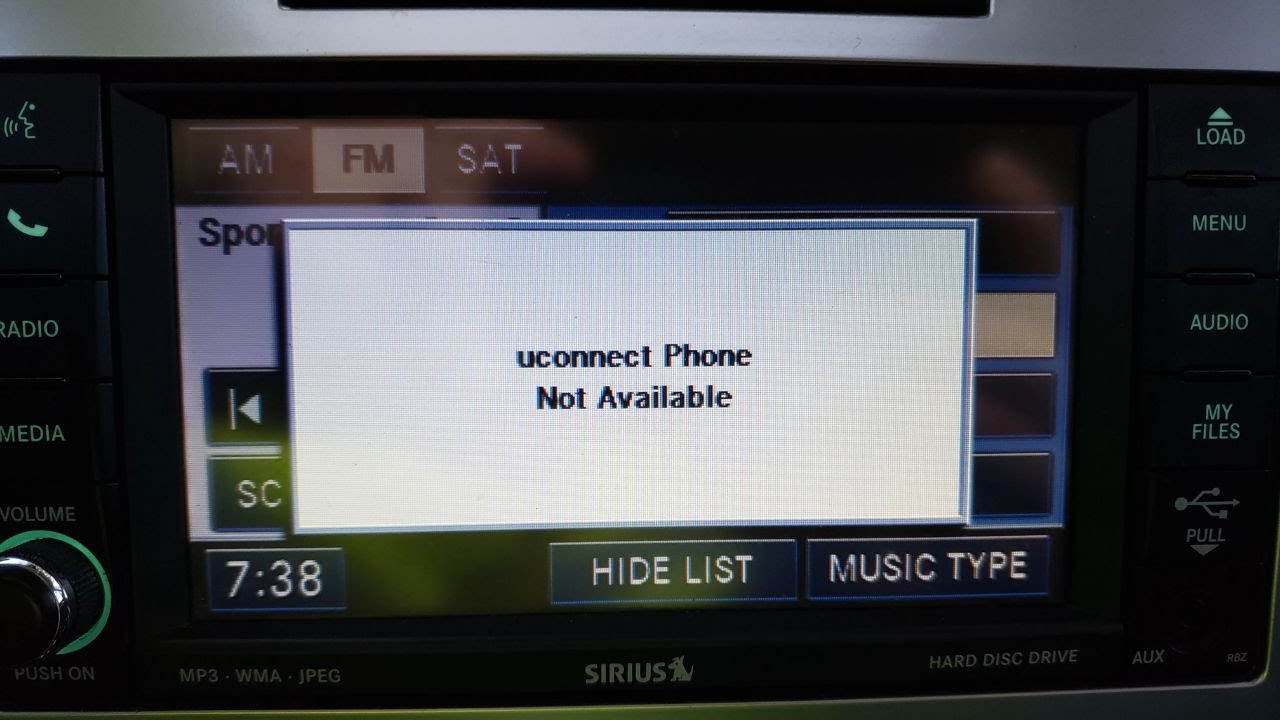
The Uconnect phone not available error most often occurs because the Bluetooth module loses its connection to your smartphone due to software conflicts, outdated firmware, or a failed pairing handshake.
What Causes the Uconnect Phone Not Available Error?
The Uconnect system frequently drops phone connectivity when the head unit fails to maintain a stable Bluetooth link after the vehicle is restarted or after a software update.
This happens because the factory Bluetooth module has known weaknesses in handling modern phone operating systems that change their Bluetooth stack frequently.
Real-world diagnostics show three primary triggers: corrupted pairing data stored in the head unit, interference from multiple paired devices, and hardware degradation in the telematics module on vehicles built between 2014 and 2019.
Dealerships often misdiagnose this as a full radio replacement when a simple module reset resolves the issue.
Software Version Mismatch
Newer Android and iOS releases alter Bluetooth security protocols, which older Uconnect firmware cannot interpret correctly.
Owners report the error appearing immediately after a phone OS update even when the vehicle was working the day before.
Multiple Device Conflicts
When more than three phones remain paired to the same Uconnect unit, the system struggles to decide which device should take priority during startup.
This leads to the phone option disappearing from the menu entirely until the list is cleared.
How to Perform a Full Uconnect Reset for Phone Connectivity
A complete reset clears corrupted Bluetooth cache files and forces the module to rebuild its device table.
This procedure works on most 2013-2020 Chrysler, Dodge, Jeep, and Ram vehicles without requiring dealer tools.
- Park the vehicle and turn the ignition to the RUN position without starting the engine.
- Press and hold the volume knob and the tuner knob simultaneously for 20 seconds until the screen goes black and restarts.
- Navigate to Settings > Phone and delete every paired device listed after the system reboots.
- Turn the ignition completely off and wait three minutes before restarting.
- Re-pair your phone only after confirming no other devices appear in the list.
Many owners find this restores phone availability immediately, but the fix can fail if the underlying firmware remains outdated.
Step-by-Step Bluetooth Pairing After Clearing Devices
Re-pairing must follow a strict sequence to prevent the same conflict from returning.
Skip any step and the phone may connect for music but still show unavailable for calls.
- ✔ Enable Bluetooth on your phone and make sure it is discoverable.
- ✔ Select Phone > Add Device > Start Pairing on the Uconnect screen.
- ✔ Enter the PIN shown on the screen when your phone appears.
- ✔ Disable media audio in your phone settings while leaving phone audio enabled initially.
- ✔ Test an outgoing call before enabling any other audio profiles.
Model-Specific Solutions for Persistent Phone Not Available Issues
2014-2018 Jeep Cherokee and Grand Cherokee
These models suffer from a known issue where the Bluetooth antenna located behind the rearview mirror loses signal strength.
Owners must remove the mirror trim, inspect the coaxial cable for corrosion, and reseat the connector. Replacement antennas cost under $40 and resolve the problem on vehicles where resets fail repeatedly.
2015-2019 Ram 1500 and 2500
The telematics module mounted under the center console overheats on these trucks.
Removing the module, cleaning the thermal paste, and reinstalling it with fresh paste restores stable Bluetooth operation. This repair takes 45 minutes and avoids the $1,200 module replacement quoted by many dealers.
2016-2020 Chrysler Pacifica
Pacifica vans require a software flash using wiTECH to update the radio to version 17.26 or newer.
Independent shops with aftermarket diagnostic tools can perform this update for roughly $150, while dealerships often push for a full radio replacement instead.
When to Replace the Bluetooth Module Instead of Resetting
If the phone still fails to appear after three full resets and a firmware update, the internal Bluetooth transceiver has likely failed.
The module sits behind the radio on most vehicles and can be swapped in under two hours with basic trim tools.
Used modules from salvage vehicles work reliably when programmed with the vehicle VIN using a compatible scan tool.
Preventing the Error From Returning After Repair
Limit the number of paired devices to two maximum.
Disable automatic Bluetooth reconnection on your phone when leaving the vehicle so the system does not attempt failed handshakes at every startup.
Perform a reset every six months as preventive maintenance even if no symptoms appear.
Frequently Asked Questions
Will disconnecting the battery clear the phone not available message?
Disconnecting the battery only performs a partial reset and often leaves pairing data intact, so the error returns within a few drive cycles. The knob-hold reset method clears far more memory locations.
Does the Uconnect phone not available issue affect Android Auto or Apple CarPlay?
Wireless CarPlay and Android Auto rely on the same Bluetooth radio, so the same module failure prevents both features from appearing. Wired connections through the USB port usually continue working.
Can aftermarket stereos avoid this problem entirely?
Aftermarket units with updated Bluetooth chipsets rarely experience the same dropped connections, but they lose factory steering wheel controls and backup camera integration unless expensive interface modules are added.
How much does a dealership typically charge to diagnose this error?
Most dealerships quote one hour of diagnostic time at $120-$180 simply to confirm the Bluetooth module is at fault, even though the reset procedure takes owners less than five minutes at no cost.
Conclusion
The Uconnect phone not available problem almost always traces back to pairing data corruption or an aging Bluetooth module rather than a complete radio failure.
Following the reset sequence, limiting paired devices, and addressing model-specific hardware weaknesses resolves the issue for the majority of owners without expensive dealer intervention.
Persistent cases require module replacement or a firmware flash performed by a shop equipped with the correct diagnostic software.
Leave a Reply