
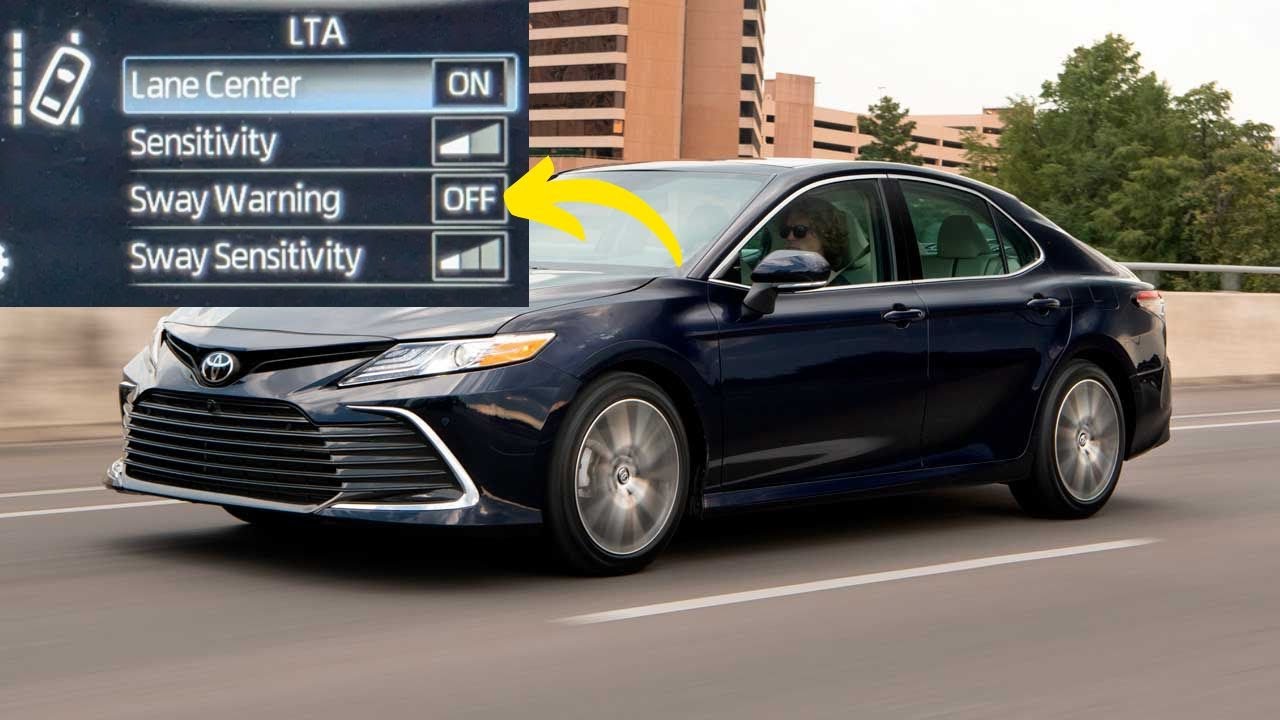
The Toyota Sway Warning is a driver-assist feature that detects unintentional vehicle swaying or drifting within a lane—typically caused by drowsy or distracted driving—and alerts the driver with a buzzer sound and a “Take a Break” message on the instrument cluster. It is part of the Toyota Safety Sense (TSS) suite and uses the front camera to monitor lane position and steering behavior.
What Does the Sway Warning Mean on a Toyota Dashboard?
The Sway Warning indicator on your Toyota dashboard means the system has detected a pattern of unintended lateral movement within your lane. It triggers when the vehicle oscillates side to side without clear steering input from the driver, which the system interprets as a sign of fatigue or inattention.
When activated, you will typically see a “Take a Break” message accompanied by a yellow or amber sway warning icon and an audible buzzer. This is not a mechanical fault indicator—it is an active safety intervention designed to prevent accidents caused by drowsy driving.
How the Sway Warning System Works
The system relies on the forward-facing camera mounted behind the windshield near the rearview mirror. This camera continuously monitors lane markings and tracks the vehicle’s trajectory relative to them.
When the system detects repeated or exaggerated corrections—where the car weaves within the lane without the driver making deliberate steering inputs—it classifies this behavior as “sway.” The algorithm evaluates steering angle, lane position deviation, and the frequency of corrections over a short time window.
- ▸ The camera reads lane markings and vehicle position within the lane
- ▸ The system monitors steering input patterns and frequency
- ▸ Repeated unintended corrections trigger the sway detection algorithm
- ▸ Visual and audible warnings alert the driver to take a break
What Toyota Models Have the Sway Warning Feature?
The Sway Warning feature is available on most Toyota models equipped with Toyota Safety Sense (TSS) or Toyota Safety Sense 2.0 (TSS 2.0) and newer. It is standard or available on models from approximately 2018 onward, depending on the trim level and market.
Models Commonly Equipped with Sway Warning
If your Toyota has Lane Departure Alert (LDA) with Steering Assist, it likely also has the Sway Warning function. Check your owner’s manual under the “Toyota Safety Sense” section to confirm.
Why Does the Toyota Sway Warning Keep Coming On?
The most common reason the Sway Warning keeps activating is genuine driver fatigue, but there are several other causes that owners frequently report. Understanding these triggers helps you determine whether the system is working correctly or malfunctioning.
Cause 1: Driver Fatigue or Distraction
This is the intended trigger. If you have been driving for extended periods without breaks, the system detects reduced steering precision. Long highway drives, especially at night, are the most common scenario where this warning appears.
The system is calibrated to detect patterns over a specific distance and time window. Even subtle weaving that you might not notice yourself will be picked up by the camera-based monitoring system.
Cause 2: Strong Crosswinds or Road Conditions
Heavy crosswinds, uneven road surfaces, or roads with steep banking can cause the vehicle to sway without driver input. The system may interpret this environmental movement as driver fatigue and trigger a false warning.
This is particularly common in regions with open highways prone to gusting winds, or on roads with worn or inconsistent lane markings that confuse the camera system.
Cause 3: Dirty or Obstructed Windshield Camera
The front camera behind the windshield requires a clear view of the road and lane markings. Dirt, ice, fog, stickers, or even a misaligned windshield replacement can obstruct the camera and cause erratic readings.
- ▸ Clean the windshield area directly in front of the camera module
- ▸ Check for any aftermarket tint strips or accessories blocking the camera housing
- ▸ Ensure the windshield is OEM-spec if it has been replaced, as camera calibration varies by glass type
Cause 4: Worn or Faded Lane Markings
The sway warning system depends heavily on visible lane markings. On roads with faded, missing, or inconsistent lane paint, the camera struggles to accurately track vehicle position. This causes the system to misinterpret normal driving as swaying behavior.
If you notice the warning only appears on certain roads, faded lane markings are likely the culprit rather than a system malfunction.
Cause 5: Camera Misalignment After Windshield Replacement
This is a frequently overlooked issue. When a windshield is replaced on a Toyota with TSS, the forward-facing camera must be recalibrated. If the shop that replaced the glass did not perform a static or dynamic camera calibration, the sway warning and other TSS features may behave erratically.
Always insist on OEM windshield glass and a proper ADAS camera calibration after any windshield replacement. This typically costs between $150 and $350 at a dealer or qualified independent shop, but skipping it leads to ongoing false warnings and potential safety system failures.
How to Turn Off or Reset the Sway Warning on a Toyota
You can disable the Sway Warning function through the vehicle’s settings menu, though Toyota does not recommend permanently turning it off. The process varies slightly by model and infotainment system generation.
Method 1: Through the Multi-Information Display (MID)
- 1 Use the steering wheel controls to navigate to the “Settings” or “Vehicle Settings” menu on the instrument cluster display
- 2 Select “Toyota Safety Sense” or “Driving Assist”
- 3 Find “Sway Warning” in the list of features
- 4 Toggle the setting to “Off”
- 5 Confirm the change when prompted
Method 2: Through the Touchscreen Infotainment System
- 1 Tap the “Menu” button on the touchscreen
- 2 Navigate to “Vehicle” or “Setup”
- 3 Select “Toyota Safety Sense” settings
- 4 Locate “Sway Warning” and disable it
- 5 The system will remember this setting even after the vehicle is restarted
Important: On some newer Toyota models with TSS 2.5 or TSS 3.0, the sway warning may automatically re-enable each time the vehicle is started. This is a safety-by-default design philosophy from Toyota and cannot be permanently overridden without dealer intervention.
Sway Warning vs. Lane Departure Alert: What Is the Difference?
Many Toyota owners confuse the Sway Warning with Lane Departure Alert (LDA), but they are distinct functions within the Toyota Safety Sense suite. Understanding the difference helps you interpret dashboard warnings correctly.
Both features use the same front camera, but their algorithms evaluate different driving patterns. Sway Warning looks for oscillation patterns, while LDA looks for boundary crossings.
How to Fix Persistent or False Sway Warning Alerts
If your Toyota’s Sway Warning is triggering when you are alert and driving normally, follow these diagnostic steps before visiting a dealership.
Step 1: Clean the Windshield and Camera Area
Use a microfiber cloth and glass cleaner to thoroughly clean the windshield, especially the area around the camera housing behind the rearview mirror. Even a thin film of dirt or condensation can degrade camera performance.
Step 2: Check Windshield Replacement History
If the windshield has been replaced, verify whether an ADAS camera calibration was performed. Contact the shop that did the replacement and ask for calibration documentation. If no calibration was done, schedule one immediately.
Step 3: Update Vehicle Software
Toyota periodically releases software updates for the TSS system that refine detection algorithms and reduce false alerts. Ask your dealer to check for available TSS software updates during your next service visit. Some updates are covered under warranty or TSB (Technical Service Bulletin) campaigns.
Step 4: Drive on a Well-Marked Road to Test
Take the vehicle on a highway with clear, freshly painted lane markings and drive normally for 20 to 30 minutes. If the warning does not appear, the issue is likely road-dependent rather than a vehicle fault.
Step 5: Visit the Dealer for Camera Inspection
If none of the above resolves the issue, the camera module itself may be faulty or misaligned. A Toyota dealer can run a full TSS diagnostic, check camera alignment values, and inspect for internal fault codes that do not trigger a check engine light.
Frequently Asked Questions
Is it safe to drive with the Sway Warning on?
The Sway Warning itself is not a mechanical problem—it is an informational alert. However, if it is triggering because you are genuinely fatigued, you should pull over and rest. If it is triggering falsely, it is safe to drive but you should have the system checked to ensure other TSS features are functioning correctly.
Does the Sway Warning affect insurance or vehicle inspections?
No. The Sway Warning is a passive driver-assist feature and has no impact on insurance rates or vehicle inspections. It does not store data that is accessible to insurance companies, though Toyota may collect anonymized data through connected services.
Can I disable Sway Warning permanently on a 2024 Toyota?
On most 2024 models with TSS 2.5 or newer, you can disable it through the settings menu, but it may re-enable on the next ignition cycle. Toyota’s design philosophy prioritizes safety defaults. A dealer may be able to code it off permanently, but this could affect warranty coverage for TSS-related claims.
Why does the Sway Warning only appear on the highway and not in the city?
The Sway Warning is calibrated to operate at speeds above approximately 30 mph, which means highway driving is its primary operating environment. At lower city speeds, lane-keeping behavior is different and the system does not evaluate sway patterns.
Does a dashcam interfere with the Sway Warning system?
A dashcam mounted too close to the TSS camera housing behind the rearview mirror can partially obstruct the forward-facing camera’s field of view. Mount dashcams on the passenger side of the rearview mirror, away from the camera module, to avoid interference.
Take the Sway Warning Seriously—But Know When It Is Wrong
The Toyota Sway Warning is a genuinely useful safety feature that has likely prevented countless drowsy-driving accidents. When it activates correctly, it is telling you something important about your driving state. However, the system is not infallible—faded road markings, crosswinds, dirty windshields, and uncalibrated cameras can all cause false alerts.
If you are experiencing persistent false warnings, start with the simplest fixes: clean your windshield, verify camera calibration history, and test on well-marked roads. If the problem persists, a dealer-level TSS diagnostic is the definitive way to determine whether the camera module needs recalibration or replacement. Do not ignore repeated false alerts, as they may indicate a broader issue with your vehicle’s safety sensing system that could affect other features like Pre-Collision Warning and Lane Departure Alert.
Leave a Reply