
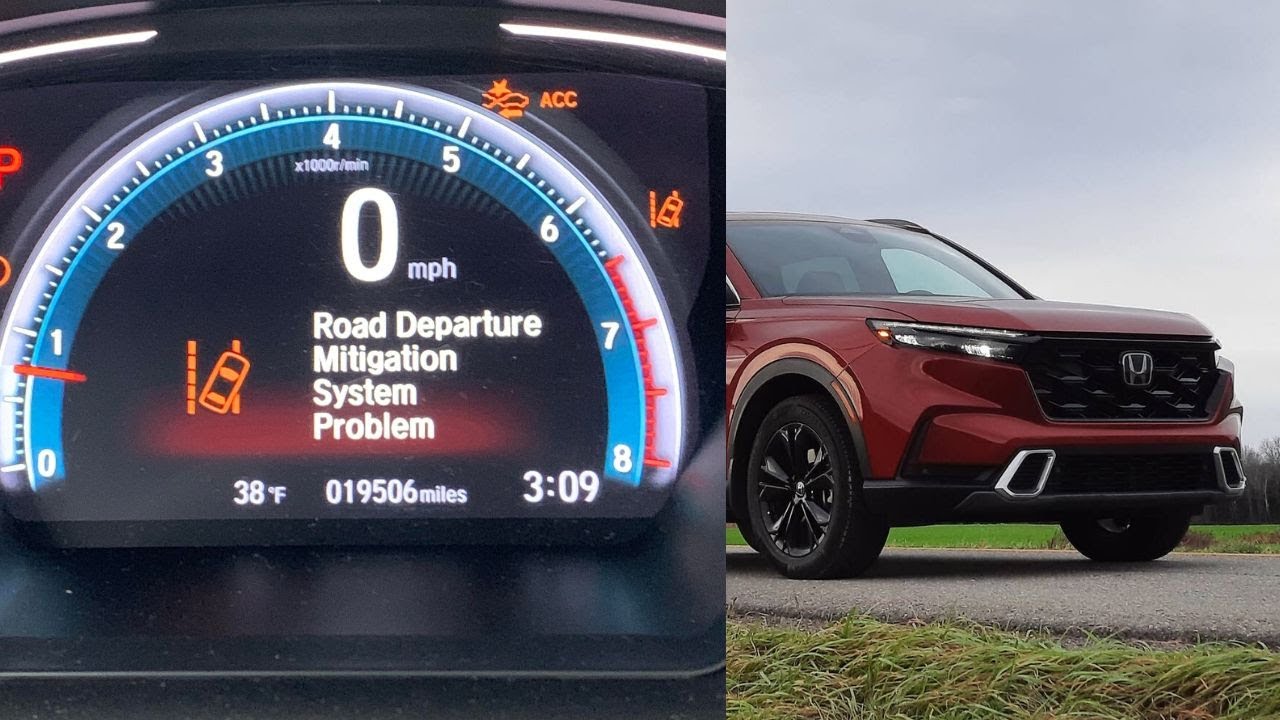
The Honda Road Departure Mitigation (RDM) system commonly malfunctions due to a dirty or obstructed front camera, misaligned camera after windshield replacement, outdated software, or a faulty radar unit behind the Honda emblem. Most problems can be resolved by cleaning the windshield area near the camera, recalibrating the camera system, updating the ECU software at a dealership, or replacing the multi-purpose camera unit if it has failed internally.
What Is the Honda Road Departure Mitigation System and How Does It Work?
The Road Departure Mitigation system is Honda’s active safety feature designed to prevent unintentional lane departures. It uses a combination of a monocular camera mounted behind the windshield and, on some models, a millimeter-wave radar behind the front emblem to monitor lane markings.
When the system detects that your vehicle is drifting off the road or crossing lane lines without a turn signal activated, it takes corrective action. This includes providing steering torque to guide you back into the lane and applying brake pressure to individual wheels if necessary.
The RDM is part of the broader Honda Sensing suite that includes Adaptive Cruise Control, Collision Mitigation Braking, and Lane Keeping Assist. Understanding how these systems interact is critical because a failure in one component—like the front camera—can trigger problems across multiple features simultaneously.
Key Components of the RDM System
- Multi-Purpose Camera (MPC) – Mounted behind the rearview mirror, this camera reads lane markings and road edges
- Millimeter-Wave Radar – Located behind the front Honda emblem on select models, assists with object detection
- ECU/Control Module – Processes sensor data and decides when to intervene
- Steering Angle Sensor – Monitors driver input to determine intentional versus unintentional lane changes
- VSA (Vehicle Stability Assist) Module – Handles brake intervention when the system activates
The system only functions when driving above approximately 45 mph (72 km/h) and when clear lane markings are detected. If the camera cannot identify lane lines, the RDM will not activate, which is by design—not necessarily a fault.
Why Does the Honda RDM System Problem Warning Light Come On?
The “RDM Problem” or “Road Departure Mitigation System Problem” message typically appears on the instrument cluster when the camera unit fails, the windshield is obstructed, or the system encounters a communication error with other modules. It often appears alongside other Honda Sensing warnings.
When this warning appears, it does not always mean an expensive repair is needed. In many cases, the system has simply entered a temporary disabled state due to environmental conditions or minor sensor interference. However, a persistent warning that stays on across multiple drive cycles usually points to a hardware or software fault that needs attention.
Common Triggers for the RDM Warning Light
- Dirty or foggy windshield near the camera housing – Even a thin film of grime in front of the camera can cause misread lane markings
- Sun glare or low-angle sunlight – Direct sunlight into the camera lens temporarily blinds the sensor
- Heavy rain, snow, or fog – The camera cannot distinguish lane markings in poor visibility
- Faded or missing road markings – The system relies on painted lane lines; it cannot read gravel or unmarked roads
- Camera unit failure – Internal circuitry or lens damage inside the MPC
- Software calibration error – Corrupted software or failed update
- Wiring harness damage – Rodent-chewed wires or corroded connectors near the camera
If the warning clears after restarting the vehicle and does not return, it was likely a temporary environmental trigger. If it comes back every time you drive, you need a proper diagnostic scan with an OBD-II tool that reads Honda-specific codes.
How to Fix Honda Road Departure Mitigation System Problem at Home
Before heading to a dealership, there are several DIY steps you can try that resolve the RDM warning in a significant number of cases. These steps address the most common non-hardware causes of the system fault.
Step 1: Clean the Windshield Camera Area
This is the single most overlooked fix. The multi-purpose camera sits behind a specific section of the windshield near the rearview mirror. Even if the rest of your windshield looks clean, a smudge, bug splatter, or oily film in front of the camera housing will cause problems.
- Use a microfiber cloth with isopropyl alcohol (not glass cleaner with ammonia)
- Clean the area directly behind the rearview mirror on the outside of the windshield
- Also clean the camera lens on the inside if accessible without removing the housing
- Avoid touching the camera lens with bare fingers—oils from skin create glare issues
Step 2: Check and Reset the System
After cleaning, perform a full system reset:
- Turn the ignition off and wait at least 30 seconds
- Start the engine and let it idle for one minute
- Drive at above 45 mph on a road with clear lane markings for at least two minutes
- Check if the warning clears
Step 3: Inspect for Wiring Damage
Pop the cover off the camera housing (usually snaps or slides off) and inspect the wiring harness connected to the camera unit. Look for:
- Pinched or frayed wires
- Corrosion on connector pins
- Loose or partially unplugged connectors
- Rodent damage (bite marks on wire insulation)
Step 4: Check Your Windshield History
If you have had your windshield replaced, the camera almost certainly needs recalibration. Most aftermarket glass installers do not perform this step, and even some dealerships miss it. A misaligned camera is one of the top causes of persistent RDM errors after glass replacement.
Honda RDM System Problems by Model: Accord, Civic, CR-V, HR-V, Pilot
Not all Honda models experience RDM problems equally. Certain model years have known weaknesses tied to specific hardware revisions or software calibrations. Here is what owners commonly report by model.
Honda Accord (2018–2024)
The 10th and 11th generation Accord is one of the most affected models. Owners frequently report the RDM warning appearing in conjunction with the LKAS warning. The root cause in many cases is a faulty multi-camera unit that Honda addressed with a software update in certain production batches.
- Check if TSB 20-046 or similar applies to your VIN
- 2018–2020 models had a higher rate of camera failure than 2021+
- Some owners resolved the issue by replacing the camera unit (part number varies by year)
Honda Civic (2016–2024)
The Civic tends to show RDM problems more in cold climates. Moisture intrusion into the camera housing is a known issue on 10th-generation models, causing fogging on the internal lens surface. This is not fixable by cleaning the outside of the windshield.
- If you see condensation inside the camera housing, the housing seal is compromised
- The camera unit and housing may need replacement as an assembly
- Warming the car and allowing the defroster to run sometimes temporarily resolves fogging
Honda CR-V (2017–2024)
CR-V owners often report RDM problems after driving on rural highways with absent or poorly maintained road markings. This is a design limitation, not a fault—the system simply cannot work without visible lane lines. However, some 2017–2019 CR-Vs experienced genuine camera failures that Honda addressed under extended warranty in certain regions.
Honda HR-V (2019–2024)
The HR-V uses a slightly different camera calibration than larger Honda models. Some owners report the system being overly sensitive, applying steering correction when driving near highway exit ramps or road shoulders. This is usually adjustable through the RDM sensitivity settings in the vehicle’s infotainment menu.
Honda Pilot (2016–2024)
Pilot owners have reported RDM-related issues tied to the radar unit behind the front emblem rather than the camera. Hail damage, minor front-end collisions, or even aggressive car washes can misalign the radar, which indirectly affects RDM performance since some functions rely on both camera and radar input.
How Much Does It Cost to Fix Honda RDM System Problem?
Repair costs vary significantly depending on the root cause. Here is a realistic breakdown based on common repair scenarios at both dealerships and independent shops.
| Repair Type | Dealership Cost | Independent Shop Cost |
|---|---|---|
| Camera recalibration only | $250–$450 | $150–$300 |
| Software update/flashing | $100–$200 | $50–$150 |
| Camera unit replacement | $600–$1,200 | $400–$900 |
| Radar unit replacement | $800–$1,500 | $600–$1,200 |
| Windshield replacement + recalibration | $900–$1,800 | $600–$1,400 |
Always check if your vehicle is covered under Honda’s 3-year/36,000-mile bumper-to-bumper warranty or any extended warranty for Honda Sensing components. Some owners have successfully argued for goodwill repairs outside warranty for known camera failure issues—especially if they can reference a relevant TSB.
Can You Drive with the Honda RDM System Problem Warning?
Yes, you can safely drive with the RDM system disabled. When the warning appears, the system deactivates itself but does not affect any other driving functions—steering, braking, acceleration, and all other vehicle systems continue to operate normally.
However, you lose the active lane departure protection, which means you no longer get steering or braking intervention if you drift off the road. This is a meaningful safety feature, especially on long highway drives where fatigue-related lane departures are a real risk.
When You Should Not Ignore the Warning
- If the warning appears alongside a Collision Mitigation Braking System (CMBS) warning—this may indicate a broader Honda Sensing failure
- If the warning is accompanied by unusual steering behavior or pulling
- If multiple Honda Sensing warnings appear simultaneously—this often points to a shared component failure like the camera or CAN bus communication
How to Prevent Honda RDM System Problems
Prevention is far cheaper than repair when it comes to Honda Sensing components. Most RDM problems trace back to preventable causes.
- Keep the windshield clean in the camera area at all times—treat it as a sensor, not just glass
- Use Honda-approved windshield glass if replacement is ever needed—aftermarket glass sometimes has slightly different optical properties that confuse the camera
- Always request camera recalibration after any windshield work—do not assume the shop will do it automatically
- Park in a garage when possible to reduce condensation buildup inside the camera housing
- Stay current on Honda software updates—many camera-related bugs are fixed through ECU flashes at the dealership
- Avoid pressure washing the area directly around the camera housing and front radar emblem
- Address front-end damage promptly—even minor bumper impacts can shift the radar unit enough to affect RDM calibration
Frequently Asked Questions About Honda RDM System Problems
Does the Honda RDM system work at night?
The RDM system does function at night, but its performance depends heavily on road marking visibility and ambient lighting. On poorly lit roads with faded or absent lane markings, the system may not detect the road edge and will not activate. Well-maintained highway lane markings with reflective paint generally work fine in darkness.
Will disconnecting the battery reset the Honda RDM warning?
Disconnecting the battery may temporarily clear the warning, but if the underlying fault persists, the warning will return within a few drive cycles. The system runs a self-diagnostic check every time the vehicle starts, and if the camera or radar reports a fault, the warning will reappear. This is not a permanent fix.
Can a dashcam interfere with Honda’s RDM camera?
Yes, poorly positioned dashcams can obstruct or reflect light onto the multi-purpose camera behind the rearview mirror. Mount any dashcam to the passenger side of the mirror, away from the camera housing area. Some adhesive mounts or suction cups near the sensor housing can also create glare issues at certain sun angles.
Does tinting the windshield affect the RDM system?
Windshield tint strips or ceramic coatings applied near the camera area can interfere with the camera’s ability to read lane markings. If you apply any tint or film, keep it well below the camera housing area. High-quality ceramic coatings generally do not cause issues, but cheap tint films with inconsistent optical clarity absolutely can trigger RDM warnings.
Why does my Honda RDM only malfunction on certain roads?
This is normal behavior, not a fault. The RDM system relies entirely on visible lane markings.
Roads with no markings, temporary construction zones, faded paint, or unusual road geometry (sharp curves without markings, merging lanes) will cause the system to disengage. It will typically display a “RDM temporarily unavailable” message rather than a system problem warning in these cases.
Take Control of Your Honda RDM Issue Before It Costs You
The Honda Road Departure Mitigation system is a genuinely useful safety feature when it works properly, but the number of false warnings and misdiagnosed faults is frustratingly high. Most RDM problems are not catastrophic failures—they are caused by a dirty windshield, a misaligned camera after glass replacement, or outdated software that a simple dealership flash can resolve.
Before you agree to a $1,000-plus camera replacement, work through the DIY steps outlined above. Clean the windshield, check the wiring, verify your windshield history, and request a software update check. If the problem persists, get a diagnostic scan that reads Honda-specific body and safety codes—not just generic OBD-II codes, which will not capture Honda Sensing faults.
Document everything, reference applicable TSBs, and do not hesitate to push back if a dealership tries to quote a full camera replacement before performing a basic recalibration or software update. You have more leverage than you think, especially on vehicles within a few years of warranty coverage.
Leave a Reply