
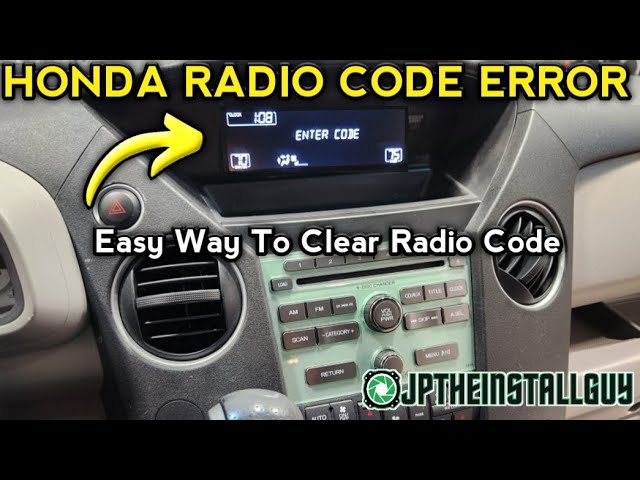
The Honda radio code is a 5-digit anti-theft number you can find on a sticker inside your glove box, in your owner’s manual packet, or by retrieving it free through the official Honda Radio/Navi Code website using your VIN and radio serial number.
If those options fail, any Honda dealer can look it up using your VIN, vehicle registration, and proof of ownership.
Here is every method that actually works, step by step, based on years of dealing with this exact frustration across every Honda model.
Where Is the Honda Radio Code Located?
The radio code is most commonly found on a small sticker inside your glove box or on the side of the glove box door frame.
Honda dealers and service technicians have been placing these anti-theft code stickers there since the early 1990s.
Check These Physical Locations First
Before you call anyone or go online, spend two minutes checking these spots on your actual vehicle:
- Glove box sticker: Open the glove box and look on the inner left wall, the door panel, or the bottom. You are looking for a small white or yellow sticker that says “Code” followed by a 5-digit number and possibly a 4-digit serial number.
- Owner’s manual packet: Many Honda owners never flip through the radio code card that came in the original document sleeve. Check every card and piece of paper in your manual.
- Trunk or spare tire area: On some older Civics and Accords, technicians stuck the code sticker near the spare tire compartment or under the trunk lid.
- Under the hood fuse box cover: Rare, but some service departments placed it on the inside of the under-hood fuse box lid.
- Sun visor or driver door jamb: Occasionally seen on older models where a tech slapped the sticker wherever was convenient.
What the Sticker Looks Like
The sticker is typically small, about the size of a business card.
It will have the word “Code” or “Anti-Theft Code” followed by a 5-digit number. Below that, you may see a 4-digit or 8-digit serial number for the radio unit itself.
Keep both numbers recorded somewhere safe once you find them.
If the previous owner removed or lost this sticker, do not panic. You still have multiple options to retrieve the code without paying a dime.
How Do I Get My Honda Radio Code Online for Free?
Honda offers a free online radio code retrieval tool at their official website.
You will need your VIN number, the radio serial number, your ZIP code, email address, and proof of ownership such as your registration or insurance card.
Step-by-Step Online Retrieval Process
- Go to the official Honda Radio and Navigation Code website (Honda’s owner portal).
- Enter your Vehicle Identification Number (VIN) — found on your dashboard, driver door jamb, or registration.
- Enter your radio serial number.
- Provide your ZIP code and email address.
- Upload or confirm proof of ownership.
- The system will email your radio code, usually within minutes.
How to Find Your Honda Radio Serial Number
The serial number is the tricky part, especially if your radio is locked.
Here is how to get it depending on your model and year:
- 2001 and newer models: Turn the ignition to ON. Turn the radio off. Press and hold the 1 and 6 preset buttons simultaneously, then turn the radio on. The serial number will display on the screen in the format “U” followed by digits or just a numeric string.
- 2000 and older models: You will likely need to physically remove the radio from the dash. The serial number is printed on a label on the top or side of the radio unit. This requires a radio removal tool or careful disassembly of the trim.
- Navigation-equipped models: Press and hold the Map, Menu, and CANCEL buttons simultaneously to display the serial number on the navigation screen.
Can a Honda Dealer Get My Radio Code?
Yes, any Honda dealership can retrieve your radio code using your VIN number.
You must provide a valid photo ID, vehicle registration or title, and proof that you own the vehicle.
What to Expect at the Dealer
Walk into the service department and tell them you need your radio anti-theft code.
Most dealers will look it up in under five minutes.
Some will charge a small fee ranging from $0 to $50, while others do it for free as a goodwill gesture, especially if you are a regular service customer.
Why Some Dealers Charge and Others Do Not
- Free dealerships: Many dealers treat this as a simple customer retention service. They access Honda’s internal database and print your code on the spot.
- Charging dealerships: Some dealers consider it a service fee and charge labor. If they want to charge more than $50, go to another dealer or try the online method first.
- Independent shops: Most independent mechanics do not have access to Honda’s code database. Stick with an authorized Honda dealer for this specific request.
How to Enter the Honda Radio Code Correctly
Once you have your 5-digit code, entering it wrong repeatedly can lock you out further.
Follow the exact procedure to avoid additional lockout periods.
Standard Entry Method
- Turn the ignition to the ON position (do not start the engine).
- Turn on the radio. The display should read “CODE” or “Enter Code.”
- Use the preset buttons 1 through 5 to enter each digit of your code. For example, if your code is 34512, press preset 1 three times, preset 2 four times, preset 3 five times, preset 4 one time, and preset 5 two times.
- After all five digits are entered, the radio should unlock and function normally.
Model-Specific Entry Differences
| Honda Model | Year Range | Entry Method |
|---|---|---|
| Civic | 2006–2011 | Use preset buttons 1–5. Hold power button to confirm. |
| Accord | 2003–2012 | Standard preset button method. Some trims use the volume knob to scroll digits. |
| CR-V | 2005–2011 | Preset buttons 1–5. If locked, disconnect battery for 30 seconds and retry. |
| Pilot | 2006–2015 | Standard preset method. Navigation models require pressing Enter after code. |
| Odyssey | 2005–2010 | Preset buttons. If ERR displays, wait one hour with ignition ON before retrying. |
What If My Honda Radio Says ERR or ERROR?
An ERR message means you entered the wrong code too many times.
The radio has locked itself to prevent brute-force guessing. Do not keep trying, as this extends the lockout period.
How to Clear the Lockout
- Short lockout: Leave the ignition turned to ON with the radio powered on. Do not touch anything. After one hour, the ERR will clear and the display will return to CODE.
- Extended lockout: After multiple failed attempts, some radios require the battery to be disconnected for at least 30 minutes to reset the lockout timer. Reconnect, turn ignition ON, and wait the required time.
- Nuclear option: If the radio is permanently locked from previous owners guessing, a dealer may need to reset the radio unit using Honda’s diagnostic tool. This is rare but happens on heavily abused units.
What to Do If You Bought a Used Honda with No Radio Code
Buying a used Honda without the radio code is extremely common.
The previous owner never wrote it down, the glove box sticker was removed, or the manual was lost years ago.
Your Best Options as a Second-Owner
- Check the glove box again, thoroughly. Peel back any liners or mats. Some stickers are tucked in spots you would never notice at a glance.
- Use the online Honda code portal. You do not need to be the original owner. You just need a valid VIN and the radio serial number retrieved from the unit itself.
- Visit a Honda dealer with your registration and ID. They can pull the code from Honda’s national database as long as you can prove current ownership.
- Call Honda Customer Service at the national hotline if your local dealer is unhelpful. Have your VIN and registration ready.
- Aftermarket replacement: If the code is truly unretrievable and the dealer cannot help, replacing the head unit with an aftermarket stereo eliminates the anti-theft code requirement entirely and gives you modern features like Bluetooth.
Honda Radio Code FAQ
Does every Honda have a radio anti-theft code?
Most Honda vehicles from approximately 1994 through 2015 use an anti-theft radio code system. Newer models with integrated infotainment systems typically do not require a separate code, as the security is tied to the vehicle’s VIN electronically.
Will disconnecting my Honda battery trigger the radio code?
Yes, on most Honda models from 1994 to 2015, disconnecting or replacing the battery will trigger the radio to request the anti-theft code when power is restored. Always note your code before performing battery work.
Can I bypass the Honda radio code entirely?
There is no legitimate software bypass for the Honda radio code without dealer-level tools. Some aftermarket programmers claim to reset radios, but the safest and most reliable path is retrieving your actual code through Honda’s database.
Is the Honda radio code the same as the navigation code?
No, they are separate codes even on vehicles with both an audio system and a navigation unit. Each system has its own unique anti-theft code and its own serial number.
Why does Honda use a radio code in the first place?
Honda implemented the radio code anti-theft system to deter stereo theft. If a thief steals the head unit, it is useless without the code. This was especially relevant in the 1990s and 2000s when removable or valuable car stereos were commonly stolen.
Final Thoughts: Getting Your Honda Radio Back On
Retrieving your Honda radio code is straightforward when you know where to look.
Always start with the glove box sticker and owner’s manual before moving to Honda’s online portal or visiting a dealer. Write down your code and store it with your vehicle documents so you never deal with this hassle again.
The most important takeaway: never guess your radio code. Each wrong attempt locks the system further, turning a five-minute fix into an hour-long wait. Get the right code first, enter it once, and you are back in business.
Leave a Reply