
The Honda CR-V radio code is a 5-digit anti-theft security code required to reactivate your radio after a power loss (like a dead battery or disconnect). You can find it on a card in your owner’s manual packet, by calling Honda at 1-800-999-1009 with your VIN and serial number, or by retrieving it online through Honda’s official site. If the code sticker is missing or the dealer wants to charge you, there are free ways to get it.
What Is the Honda CR-V Radio Code and Why Does It Lock?
The radio code is Honda’s anti-theft lockout feature. Every time your CR-V’s battery dies, is disconnected, or the radio is removed, it enters “CODE” mode and won’t function until you enter the correct 5-digit PIN.
This is not a glitch—it’s working as designed. Honda implemented this immobilizer system starting in the late 1990s to deter radio theft.
The problem is that most owners never knew about it until they replaced a dead battery on a Sunday morning and suddenly had no music and no idea what the code is. If you just replaced your battery and your display says “CODE,” “ENTER CODE,” or shows a series of dashes, that’s exactly what happened.
Where to Find Your Honda CR-V Radio Code (Every Possible Location)
Your radio code is on a small white sticker or card labeled “Anti-Theft Radio Code” that came with the vehicle’s original paperwork. If it’s missing, you can retrieve it for free using your VIN and radio serial number through Honda’s website or by calling Honda customer service.
Here is every place to check before you call anyone:
1. Owner’s Manual Packet
- Open your glove box and pull out the original owner’s manual pouch or sleeve.
- Look for a small white credit-card-sized sticker that says “Anti-Theft Radio Code.”
- It will show the 5-digit code and often your radio’s serial number beneath it.
- Many owners throw this away or lose it during a trade-in, so don’t panic if it’s gone.
2. Glove Box or Center Console
- Some dealers stick the code label inside the glove box door, on the underside of the console lid, or on the sun visor.
- Check the fuse box cover inside the glove box—technicians sometimes tape the sticker there.
3. Honda’s Official Online Radio Code Retrieval
- Go to radio-navicode.honda.com.
- You will need your VIN (found on your dash or driver-side door jamb) and your radio’s serial number.
- Follow the prompts and the system will display your code instantly at no cost.
4. Call Honda Customer Service
- Dial 1-800-999-1009 (U.S.) during business hours.
- Have your VIN and proof of ownership ready.
- They will provide the code over the phone for free.
How to Get Your Honda CR-V Radio Serial Number
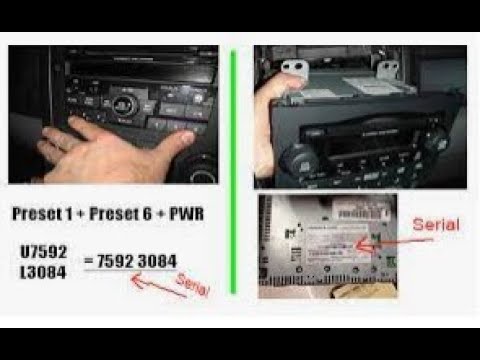
To retrieve your code online or by phone, you need the radio’s serial number. You can get it by pressing and holding specific buttons on the radio or by reading the label on the radio unit itself.
This is the step that trips people up. Honda does not store the serial number on the VIN—it’s tied to the radio hardware. Here are the methods depending on your model:
Method 1: Button Combination (Works on Most CR-V Models)
- Turn the ignition to ACC or ON (radio will display “CODE” or “—-“).
- Turn the radio OFF.
- Press and hold the 1 and 6 preset buttons simultaneously.
- While holding them, turn the radio ON.
- The display will cycle through a serial number—write it down. It usually shows a “U” followed by 4 digits, then an “L” followed by 4 digits (e.g., U1234 L5678). Combined, that’s your 8-digit serial number.
Method 2: Alternative Button Combos for Specific Model Years
| CR-V Model Year | Button Combination | Display Pattern |
|---|---|---|
| 1997–2001 (Gen 1) | Hold 1 + 6, then turn radio ON | U#### L#### |
| 2002–2006 (Gen 2) | Hold 1 + 6, then turn radio ON | U#### L#### |
| 2007–2011 (Gen 3) | Hold 1 + 6, then turn radio ON | U#### L#### |
| 2012–2016 (Gen 4) | Hold 1 + 6, then turn radio ON | U#### L#### or displayed directly |
| 2017–Present (Gen 5+) | Usually auto-restores or uses infotainment reset | Check settings menu or dealer |
Method 3: Pull the Radio and Read the Label
- If button combos don’t work, the serial number is printed on a label on the top or side of the radio chassis.
- You’ll need to partially remove the dash trim to access it—YouTube tutorials for your exact year make this manageable in under 20 minutes.
- This is common on older Gen 1 and Gen 2 units where the button method fails due to a replaced radio.
How to Enter the Honda CR-V Radio Code Step by Step
Use the preset buttons (1 through 5) to enter each digit of your 5-digit code, then press the power/volume knob or seek button to confirm.
- Turn the ignition to ON. The radio should display “CODE” or “—-“.
- Use preset button 1 for the first digit—press it repeatedly until the correct number appears.
- Use preset button 2 for the second digit.
- Use preset button 3 for the third digit.
- Use preset button 4 for the fourth digit.
- Use preset button 5 for the fifth digit.
- Press the power/volume knob or Scan button to submit.
- If correct, the radio will power on and display the clock or station.
Warning: If you enter the wrong code 10 times, the radio will permanently lock and display “ERROR” or “LOCKED.” At that point, you must leave the ignition ON with the radio powered for at least one full hour to reset the attempt counter. Some units require a battery disconnect to reset.
Common Problems and Why Your Code Won’t Work
If your radio code is rejected, the most common reasons are: wrong code for a replacement radio, an accidentally reset radio serial number, or the code was transcribed incorrectly.
Issue 1: The Radio Was Replaced by a Previous Owner
If you bought the CR-V used and the radio was swapped out, the code on the original paperwork is for the original radio—not the one currently in the dash. You’ll need to pull the serial number from the actual installed unit and request the code for that specific serial.
Issue 2: You’re Entering the Wrong Code
- Double-check you’re not confusing the number 0 with the letter O.
- Verify the code card is for your specific VIN. Dealers sometimes file paperwork incorrectly.
- Re-retrieve the code from Honda’s website using the serial number to confirm.
Issue 3: “ERR” or “ERROR” Displayed
You entered the wrong code multiple times. Leave the key in the ON position and the radio powered for 1 to 2 hours.
The display will eventually return to “CODE” and give you another chance. Do NOT turn the car off during this wait period.
Issue 4: 2017+ CR-V Models With No Code Entry
Newer CR-Vs with the 7-inch or 9-inch touchscreen infotainment system may not use a traditional radio code. Instead, the system self-restores after a battery reconnect once it confirms the original VIN match via the CAN bus.
If it still locks, visit a dealer—they can reset it with Honda’s diagnostic tool in under 5 minutes.
Can the Dealer Charge Me for the Radio Code?
Honda dealers are authorized to provide the radio code for free if you can prove ownership. If a dealer tries to charge you, escalate to Honda’s customer service line or use the online retrieval tool.
Some dealerships will try to charge a “diagnostic fee” of $50 to $150 just to look up and enter the code. This is unnecessary.
The code lookup is a free service from Honda corporate. Here’s how to avoid the charge:
- Call Honda directly at 1-800-999-1009 with your VIN—they don’t charge.
- Use the online retrieval at radio-navicode.honda.com.
- If the dealer insists on a fee, ask them to call Honda’s dealer tech line themselves—they have direct access and should not pass the cost to you.
How to Prevent Getting Locked Out Again
Write down your radio code and keep it in your phone’s notes app, your wallet, and inside the glove box so you’re never scrambling after a battery swap.
- When you first retrieve your code, photograph the sticker and store it digitally.
- If you’re having battery work done at a shop, tell them you have the code—some shops will ask before disconnecting.
- Use a battery memory saver (a small 9V or OBD-II power source) when replacing your battery. This keeps voltage to the radio and prevents the lockout entirely.
- Write the code in permanent marker on the inside of your glove box door or on the fuse box cover.
Frequently Asked Questions
Does every Honda CR-V require a radio code?
Yes, model years from approximately 1997 through 2016 use an anti-theft radio code system. Newer 2017+ models with digital infotainment systems generally self-restore without a manual code entry, though some trims still require dealer intervention.
What if I bought my CR-V used and don’t have the code card?
You can retrieve the code for free. Get your radio serial number by holding preset buttons 1 and 6 while turning the radio on, then enter that serial and your VIN at Honda’s online retrieval site or call Honda customer service.
How many times can I enter the wrong radio code?
Most Honda radios allow up to 10 incorrect attempts before locking permanently. After a lockout, leave the ignition on with the radio running for one to two hours to reset the attempt counter.
Can I bypass the Honda CR-V radio code?
There is no legitimate bypass. Third-party “code calculators” exist online but many are scams that install malware or require you to disassemble the radio. The free Honda retrieval method is safer and faster.
Will disconnecting the battery always trigger the code?
Yes, on 1997–2016 CR-Vs. Any time full power is cut to the head unit—dead battery, battery replacement, fuse pull, or radio removal—the anti-theft lockout activates and requires the code on next startup.
Final Word: Get Your Code Once, Store It Forever
The Honda CR-V radio code situation is frustrating but completely solvable in under 10 minutes once you know where to look. Retrieve the code using the free Honda tools, write it down in multiple places, and invest in a battery memory saver for future battery swaps.
Don’t let a dealership charge you $100 for a 30-second code lookup—you have everything you need to handle this yourself.
Leave a Reply