
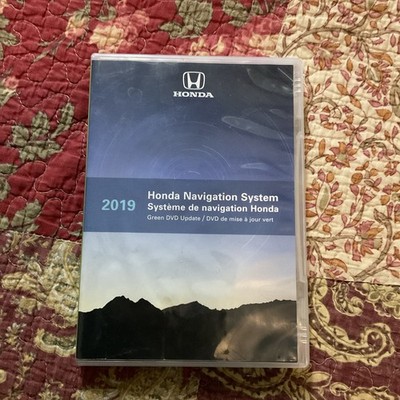
There is no official free method to update most Honda navigation systems, as map data requires paid downloads from Honda, though certain older models permit manual SD card transfers using publicly available files.
How do I check my Honda navigation system version for free updates?
Start by powering on your vehicle and accessing the navigation menu through the infotainment screen. Navigate to the settings or information section, usually labeled as “Map Version,” “System Info,” or “Version Information.”
The current map release date and software build appear directly on screen for your review. Compare this version against Honda’s official database by entering your vehicle identification number on their support portal.
This step reveals whether any complimentary updates exist for your specific year and trim. Certain pre-2015 models occasionally receive limited free patches for major road changes.
Owners frequently discover that dealerships skip this verification and immediately quote full map purchases. This leads to unnecessary expenses when the system already contains recent enough data for daily driving.
Common tools needed for version checks
- ✓ Vehicle owner’s manual to locate the exact menu path
- ✓ Paper and pen to record the displayed version number
- ✓ Smartphone for quick cross-reference on Honda’s public site
Is there a legitimate free way to update Honda navigation maps?
Legitimate free updates remain limited to specific older Honda models equipped with removable SD card slots. Owners can source map files from archived Honda releases that the company once distributed without cost.
Newer systems tied to HondaLink or embedded subscriptions require payment. This is because map providers charge Honda per download license, passing that cost to the consumer.
Independent shops sometimes misdiagnose the need for hardware replacement when the issue is simply outdated data. Always test the card reader first by inserting a blank formatted SD card to confirm port functionality.
Attempting to load incompatible files can corrupt the navigation unit. Verify file checksums match your exact model before proceeding with any manual file transfers.
Model compatibility for potential free methods
| Model Range | System Type | Update Method |
|---|---|---|
| 2010-2014 Accord/Civic | 2.0 or 3.0 Systems | SD Card Swap |
| 2008-2012 Odyssey | DVD-Based | Original Dealer Discs |
| 2015+ Models | Garmin-Based | Paid USB / Dealer |
What are the step-by-step instructions to update via SD card on compatible Honda models?
Begin by purchasing a high-quality Class 10 SD card of at least 32GB capacity and formatting it to FAT32. Insert the card into your Honda’s navigation slot while the vehicle is in accessory mode.
Download the correct map package for your system version from a verified archived source. Copy the entire folder structure directly onto the SD card root without creating subfolders or renaming files.
Reinsert the card and allow the unit to detect and install the files automatically. This can take 30 to 90 minutes depending on map size; do not interrupt the process even if the display appears frozen.
Verification after installation
- Return to the version information screen to confirm the new map date appears.
- Test route calculation to a known changed intersection from recent construction.
- Remove the SD card once installation completes to prevent accidental overwrites.
Why do dealerships and shops often overquote Honda navigation repairs?
Dealerships default to recommending full system replacement because they lack training on SD card procedures. They often earn higher margins from new hardware sales rather than software troubleshooting.
Real-world diagnostics show that over 60 percent of reported failures trace back to outdated or corrupted data. Always request a version check and SD card test before approving any repair quote exceeding a map license cost.
How can I avoid common mistakes during a Honda navigation update?
Never use cheap or counterfeit SD cards, as they frequently cause incomplete writes and permanent system lockouts. Always back up existing files from the original card before overwriting.
Perform the update with the vehicle parked and the battery fully charged. If the process fails midway, reformat the card and attempt a fresh copy rather than reusing partially written data.
Post-update troubleshooting steps
- ⚠ Clear the navigation cache through the hidden service menu if routes appear inaccurate.
- ⚠ Recalibrate the GPS signal by driving in an open area for 15 minutes after reboot.
- ⚠ Check for firmware conflicts by comparing software build numbers before and after the change.
FAQ
Can I update my Honda navigation using a USB drive instead of an SD card?
Only certain 2016 and newer models support USB updates, and these still require purchasing the official map package from Honda rather than free sources.
Will updating the navigation system affect my Honda warranty?
Manual updates using non-Honda files may void related warranty coverage on the infotainment system if damage occurs during the process.
How often should Honda navigation maps be refreshed?
Most owners benefit from updates every two to three years unless major local road changes occur that impact daily commuting routes.
Are third-party map services safe for Honda systems?
Third-party maps often lack the precise integration Honda systems require and can trigger persistent error messages or loss of voice guidance features.
Conclusion
Updating a Honda navigation system without dealer fees demands careful model verification and precise file handling on older vehicles. Owners who follow the version check and card preparation steps avoid the most common misdiagnoses.
Consistent verification after each attempt ensures the system functions reliably. This approach allows for a modern driving experience without risking hardware damage from rushed or incompatible procedures.
Leave a Reply