
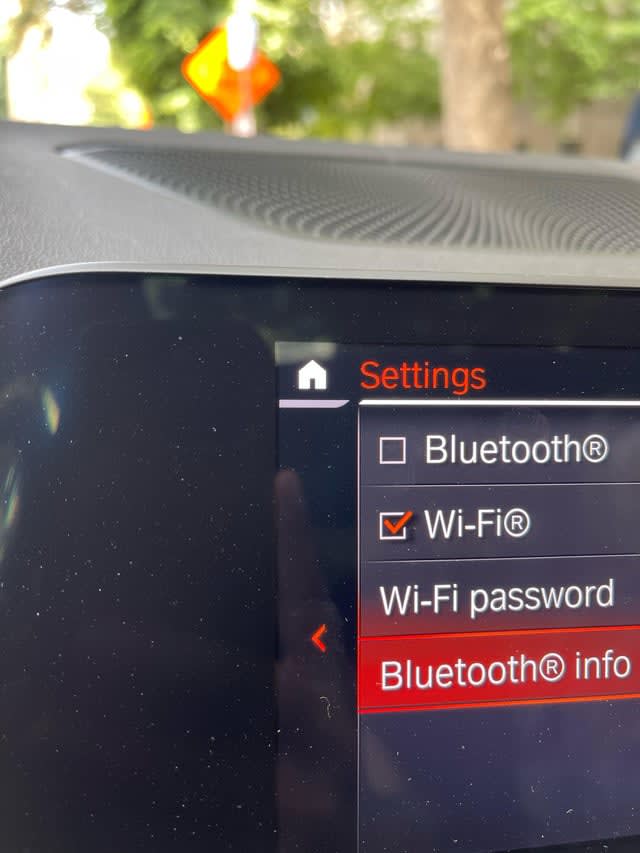
BMW Bluetooth not working is usually caused by a corrupted Bluetooth pairing cache in the iDrive system, an outdated software version, a faulty COMBOX or TCB module, or a phone compatibility issue. The fastest fix is to delete all Bluetooth devices from iDrive, reset the phone’s Bluetooth cache, and re-pair from scratch—but if the option is greyed out or audio still fails, the issue is likely hardware-related and needs deeper diagnosis.
Why Is My BMW Bluetooth Not Working?
BMW Bluetooth failures almost always trace back to software glitches, corrupted pairing data, or a failing Bluetooth control module. The iDrive system stores pairing profiles that can become corrupted after repeated connects, software updates, or battery disconnections.
1. Corrupted Bluetooth Pairing Cache
The iDrive head unit stores each paired device profile in its memory. Over time—especially after OTA updates or jump starts—these profiles can become corrupted.
Go to Menu > Telephone > Bluetooth > Paired Devices and delete every single device listed. Then restart the iDrive system by holding the power button for 30 seconds or removing the negative battery terminal for 10 minutes.
2. Outdated iDrive Software
BMW regularly releases patches for Bluetooth stability issues, especially for NBT and EVO head units. Check your software version under Settings > System Info > Software Version.
Dealerships often skip these updates unless you specifically ask. A manual software update can resolve intermittent disconnects that no amount of re-pairing will fix.
3. Faulty COMBOX or TCB Module
BMW uses a dedicated communication box—COMBOX in older models or TCB (Telematics Communication Box) in newer ones—to handle Bluetooth and phone functions. If this module fails, Bluetooth may grey out, disappear entirely, or show as “not available.”
A failing COMBOX typically also affects USB media, iDrive phone connectivity, and sometimes even your OBD port data. If multiple communication features are down simultaneously, the module is the likely culprit.
4. Phone-Side Bluetooth Conflict
iPhone and Android both have known Bluetooth stack bugs that affect BMW iDrive. iPhones running iOS 16 or later have reported frequent disconnects with BMW NBT EVO systems.
Toggle Bluetooth off and on, clear the phone’s Bluetooth cache (Settings > Bluetooth > Forget Device on both sides), and make sure the phone isn’t connected to another car or device at the same time.
BMW Bluetooth Keeps Disconnecting During Calls—How Do I Fix It?
Random Bluetooth drops during calls are usually caused by electromagnetic interference from nearby modules, a weak antenna connection behind the dashboard, or iDrive power management settings.
1. Bluetooth Interference from Wireless Charging Pad
If your BMW has the built-in wireless charging tray, it can interfere with the Bluetooth signal. Remove your phone from the charging pad and test if the disconnect stops.
Some owners have permanently fixed this by disabling the wireless charging function or placing a thin EMI shield between the pad and phone.
2. Loose Antenna Connector Behind the Dashboard
The Bluetooth antenna connects to the COMBOX or TCB via a small coaxial cable routed behind the dashboard or near the center console. Vibrations can loosen this connector over time.
Remove the center console trim or glovebox panel depending on your model, locate the communication box, and check that the antenna coaxial connector is fully seated. Reseat it and see if connectivity improves.
3. iDrive Power-Saving Mode
Some BMW models with Efficient Dynamics will aggressively cut Bluetooth power to save battery. Navigate to Settings > General > Power Management and check if Bluetooth is being throttled.
Disabling auto-stop start temporarily can also prevent the iDrive from briefly cutting Bluetooth during engine restarts.
BMW Bluetooth Audio Has No Sound—What Causes This?
No sound through Bluetooth while calls work fine is almost always an audio source routing problem in iDrive, not a Bluetooth connection issue. The system is paired and connected, but audio is being sent to the wrong output.
1. Audio Source Not Switched to Bluetooth
Press the MEDIA button on your iDrive controller and ensure the source is set to Bluetooth Audio. Many BMW systems default to FM radio or USB after a restart.
2. Volume Muted in iDrive or Phone
Check both the car volume and the phone’s media volume slider. BMW iDrive has separate volume levels for navigation, phone calls, and Bluetooth media—and they can be individually muted.
3. Codec Incompatibility
Certain music apps use codecs like LDAC or aptX that BMW’s Bluetooth module doesn’t support. The phone may attempt to stream using an unsupported codec, resulting in silence.
On Android, go to Developer Options > Bluetooth Audio Codec and select SBC or AAC. iPhones generally handle this automatically, but switching music apps can also help isolate the issue.
BMW Bluetooth Not Connecting to iPhone—Model-Specific Fixes
iPhone Bluetooth failures on BMW systems are most common on NBT EVO and MGU (Live Cockpit) head units due to handshake protocol mismatches introduced with iOS updates.
BMW G20 3 Series / G05 X5 (MGU iDrive)
- ✦ Update iDrive software to the latest version via OTA or dealer.
- ✦ Remove the paired device from both iDrive and iPhone Bluetooth settings.
- ✦ Go to iPhone Settings > General > Reset > Reset Network Settings.
- ✦ Re-pair by initiating from the car side, not the phone.
BMW F30 3 Series / F10 5 Series (NBT EVO iDrive)
- ✦ Check if your iPhone is running iOS 15 or later—older NBT EVO versions have known incompatibility.
- ✦ Request a COMBOX software update from your dealer or BMW ConnectedDrive portal.
- ✦ If audio drops persist, the COMBOX antenna cable may need reseating behind the head unit.
For owners experiencing deeper electrical or module-related faults, it may be worth checking for related issues such as a BMW service engine soon warning, which can sometimes point to broader electronic system failures.
How to Reset BMW Bluetooth Completely—Step-by-Step
A full Bluetooth reset resolves the majority of BMW connectivity problems. Follow these steps in order for the best results.
- 1. Delete all paired devices from iDrive under Telephone > Bluetooth > Paired Devices.
- 2. Forget your car from your phone’s Bluetooth settings.
- 3. Clear the phone’s Bluetooth cache (Android: Settings > Apps > Bluetooth > Clear Cache; iPhone: Settings > General > Reset Network Settings).
- 4. Restart iDrive by holding the volume/power knob for 30 seconds until the screen goes black and reboots.
- 5. Restart your phone completely.
- 6. Re-pair from the car side—go to Bluetooth > Add New Device and follow the prompts.
FAQ
Can a dead battery cause BMW Bluetooth to stop working?
Yes. A weak or dying battery can cause the COMBOX or TCB module to lose its stored configuration. If Bluetooth stopped working right after a battery replacement or jump start, a module re-initialization at the dealer may be needed.
Does BMW Bluetooth work with Android Auto or Apple CarPlay?
Bluetooth audio and calls are separate from Apple CarPlay and Android Auto, which use Wi-Fi or USB. If CarPlay works but Bluetooth doesn’t, the issue is isolated to the Bluetooth module or pairing cache.
Can I upgrade my BMW Bluetooth module myself?
On older models like the E90 or E60, you can replace the COMBOX module yourself if you have coding software like E-Sys or NCS Expert. However, the new module needs to be coded to your VIN for full functionality.
Why does my BMW Bluetooth only work when the engine is running?
This typically indicates the iDrive head unit is entering sleep mode with ignition off. BMW systems cut power to many modules when the car is fully shut down, and Bluetooth won’t activate until the engine or accessory mode is on.
Is there a BMW recall for Bluetooth issues?
BMW has issued service bulletins for Bluetooth-related software fixes on certain NBT and EVO head units, but there is no general recall. Check with your dealer using your VIN to see if your specific vehicle has an open campaign.
Final Thoughts on Fixing BMW Bluetooth Problems
Start with the free fixes—delete pairings, update software, and reset iDrive—before assuming a hardware failure. Most BMW Bluetooth problems are software and cache-related and resolve in under 15 minutes without any tools.
If the Bluetooth option is greyed out or disappears entirely after these steps, the COMBOX or TCB module is the next likely culprit and may require coding-level diagnosis. Independent BMW specialists can often perform module replacement and coding at a fraction of the dealer cost—similar to how owners save on resets for issues like the BMW parking brake malfunction or BMW parking brake malfunction reset without dealership involvement.
Leave a Reply