
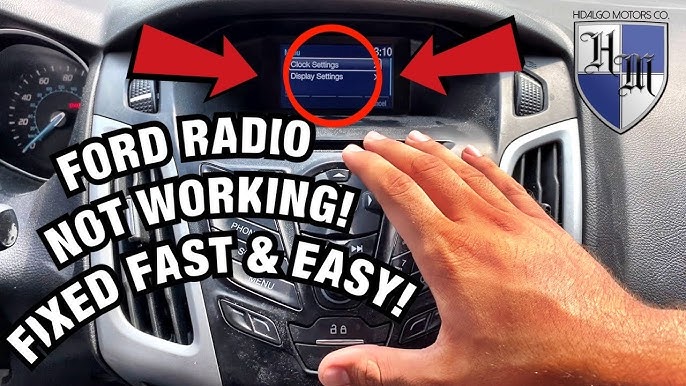
To reset a Ford radio, try pressing and holding the Power and Seek Right buttons simultaneously for 10 seconds until the screen goes black. For SYNC-equipped vehicles, press and hold the Eject and Power buttons together. If that fails, disconnect the negative battery terminal for 15 minutes to perform a hard reset.
Ford radios across different model years and infotainment generations use different reset methods. What works on a 2015 F-150 with SYNC 2 will not work on a 2020 Explorer with SYNC 3.
After diagnosing hundreds of frozen, unresponsive, and error-riddled Ford head units, the key is identifying which generation you have before attempting a reset. Doing it wrong can trigger anti-theft lockouts or wipe your Bluetooth pairings without fixing the actual problem.
How Do I Soft Reset My Ford Radio Without Losing Settings?
A soft reset reboots the radio software without erasing your presets, paired phones, or saved stations. This is the first method you should always try because it resolves roughly 70% of Ford radio glitches.
Common issues it fixes include frozen screens, unresponsive touch controls, and audio cutting out intermittently.
For Ford Vehicles with SYNC 3 (2016 and Newer)
- Turn the ignition to the ON position but do not start the engine.
- Press and hold the Power button (volume knob) and the Seek Right button at the same time.
- Keep holding both buttons for approximately 10 seconds.
- The screen will go black, then display the Ford logo as it reboots.
- Release the buttons once the Ford logo appears.
- Wait 60 to 90 seconds for the system to fully initialize before touching anything.
For Ford Vehicles with MyFord Touch / SYNC 2 (2013–2015)
- With the vehicle running, press and hold the Eject and Power buttons simultaneously.
- Hold for approximately 10 seconds until the screen turns off.
- The system will reboot automatically and return to the home screen.
- Do not press any other buttons during the reboot cycle.
For Ford Vehicles with Basic SYNC (2008–2012)
- Press and hold the Power button for 10 seconds to force a restart.
- If the unit has a separate Menu button, press and hold Menu and Power together for 10 seconds instead.
- Wait for the system to go dark and restart on its own.
If the soft reset does not resolve the issue, the problem likely stems from a deeper software corruption or hardware fault. Do not keep repeating the soft reset hoping for a different outcome.
Move on to a master reset or hard reset method instead.
How Do I Perform a Master Reset on Ford SYNC?
A master reset wipes all personalized data from the infotainment system and restores factory default settings. This clears paired phones, saved radio stations, navigation favorites, and any custom preferences.
Use this when the soft reset fails or when you are experiencing persistent Bluetooth connectivity issues, system lag, or repeated reboots.
Master Reset Through the Touchscreen (SYNC 3)
- From the home screen, tap Settings.
- Tap General.
- Scroll down and tap Master Reset.
- Confirm by tapping Yes when prompted.
- The system will shut down and reboot completely. This takes 2 to 3 minutes.
- After reboot, you will need to re-pair your phone and reprogram your preferences.
Master Reset Through the Touchscreen (MyFord Touch / SYNC 2)
- Tap the Gear icon (Settings) on the home screen.
- Navigate to Settings > System > Master Reset.
- Confirm the reset when prompted.
- The system will restart and display the initial setup wizard.
Master Reset for Non-Touchscreen Ford Radios
If your Ford radio lacks a touchscreen, perform a factory reset through the menu system using the physical buttons. Press and hold the Menu button, navigate to Factory Reset or Default Settings, and confirm with the OK button.
On some older units, pressing and holding 1 and 6 preset buttons while powering on enters a diagnostics menu where the reset option lives.
How Do I Hard Reset My Ford Radio Using the Battery?
A hard reset using the battery disconnect clears all stored power from the radio’s capacitors and forces a full cold boot. This method works when the touchscreen is completely frozen, the radio will not power on, or the soft reset and master reset both fail.
- Turn the ignition completely OFF and remove the key.
- Open the hood and locate the negative battery terminal (marked with a minus sign or black cover).
- Using a 10mm wrench, loosen the negative battery cable clamp and disconnect it from the terminal.
- Tuck the cable away from the battery so it cannot accidentally reconnect.
- Wait a minimum of 15 minutes. Some technicians recommend 30 minutes for heavily corrupted systems.
- While disconnected, press and hold the brake pedal for 30 seconds to drain residual electrical charge from the vehicle’s modules.
- Reconnect the negative battery cable and tighten the clamp securely.
- Start the vehicle and allow the radio to boot up fully before operating it.
Warning: Disconnecting the battery will also reset your engine’s adaptive learning parameters, your clock, your one-touch window features, and may trigger a TPMS warning light on some models. These will self-correct after a short drive cycle or can be manually reprogrammed.
Why Does My Ford Radio Keep Freezing or Restarting?
Repeated freezing or random restarts almost always indicate a software issue rather than a hardware failure. Ford’s infotainment platforms, especially MyFord Touch (SYNC 2), are notorious for memory management problems.
These problems cause the system to hang when too many background processes run simultaneously.
Common Causes of Repeated Freezing
- Outdated firmware: Older SYNC software versions contain known bugs that cause freezing. Ford has released multiple updates specifically to address stability issues.
- Corrupted USB media: Playing music from a corrupted or improperly formatted USB drive can crash the infotainment system.
- Too many paired Bluetooth devices: When the Bluetooth device list exceeds the system’s memory capacity, it can cause intermittent freezing.
- Failing APIM module: The Accessory Protocol Interface Module controls SYNC. When it begins to fail, freezing and random reboots become constant.
- Internal memory degradation: On older SYNC 2 units, the internal NAND flash memory wears out over time, causing progressive system instability.
How to Fix Persistent Freezing
- Update your SYNC software by visiting the official Ford owner website and downloading the latest version onto a USB drive.
- Remove all USB devices and SD cards, then test if the freezing stops.
- Delete all paired Bluetooth devices and re-pair only your primary phone.
- Perform a master reset after updating firmware.
- If the problem continues, the APIM likely needs replacement, which typically costs between $400 and $800 at a dealer but can be sourced for $150 to $300 from salvage yards or online retailers.
How Do I Reset a Ford Radio After a Battery Replacement?
After replacing or disconnecting the battery, many Ford radios enter an anti-theft lockout mode requiring a security code. This is especially common on 2004 through 2012 Ford vehicles.
The radio will display “CODE” or “LOCKED” and refuse to function until the correct code is entered.
How to Find Your Ford Radio Code
- Check your owner’s manual packet: The original radio code card is often tucked inside the manual sleeve or on a sticker inside the glove box.
- Look on the radio itself: On some models, the code is printed on a sticker on the top or side of the radio unit. You may need to partially remove the head unit to see it.
- Contact a Ford dealer: Provide your VIN and proof of ownership. The dealer can retrieve the code from Ford’s database.
- Use online code retrieval services: Several websites can generate the code based on your radio’s serial number, which is displayed on screen or printed on the unit label.
Entering the Ford Radio Code
- Turn the ignition to ON. The radio will display “CODE” or “ENTER CODE.”
- Use the preset buttons (1 through 6) to enter each digit of the code. For example, if your code is 1234, press button 1 once, button 2 twice, button 3 three times, and button 4 four times.
- On newer units, you may enter the code directly using the number pad or touchscreen.
- Once all digits are entered, press and hold the Seek or Enter button to confirm.
- If the code is correct, the radio will unlock and resume normal operation.
Be extremely careful entering the code. Most Ford radios lock permanently after three to ten incorrect attempts, depending on the model year.
A permanently locked radio requires dealer-level diagnostic equipment to unlock, or a full unit replacement.
How Do I Reset a Ford Radio That Says “Updating” and Won’t Finish?
SYNC updates that stall halfway through are one of the most frustrating Ford radio issues. The screen gets stuck on an “Updating” or “Installation in Progress” message and never completes.
This typically happens due to a faulty USB drive, interrupted power during the update, or corrupted update files.
Steps to Recover From a Stalled Update
- Do NOT turn off the vehicle or remove the USB drive if the update has been running for less than 30 minutes. Some updates legitimately take 20 to 25 minutes.
- If it has been stuck for more than 30 minutes, turn the ignition OFF, remove the key, and wait 5 minutes.
- Remove the USB drive from the media hub.
- Restart the vehicle and attempt the update again with a freshly formatted USB drive (FAT32 format, 8GB to 32GB capacity).
- Re-download the update files from the Ford owner website to ensure they are not corrupted.
- If the system is completely bricked and will not boot, disconnect the negative battery terminal for 30 minutes, then reconnect and try the update process again.
In worst-case scenarios where the update has corrupted the APIM firmware beyond recovery, the module must be reflashed using Ford’s IDS (Integrated Diagnostic System) tool at a dealership or qualified shop. This typically costs $100 to $200 in labor.
FAQ
Will resetting my Ford radio delete my navigation maps?
A soft reset will not delete your navigation maps. A master reset clears user preferences but typically preserves the map data stored on the internal drive or SD card. However, a factory firmware reflash may require map reinstallation.
Can I reset my Ford radio without the anti-theft code?
If your vehicle requires an anti-theft code after a battery disconnect, there is no way to bypass it through the radio itself. You must obtain the code from a Ford dealer, your original documentation, or a code retrieval service before the radio will function again.
Why does my Ford radio turn on but have no sound?
This usually indicates a blown audio amplifier fuse (check fuse F77 or F79 in the interior fuse box, depending on model year) or a failed speaker amplifier module. A radio reset rarely fixes a no-sound condition. Check fuses first before assuming the head unit is faulty.
How often should I update my Ford SYNC software?
Check for updates every 6 to 12 months on the Ford owner website. Ford releases stability improvements, Bluetooth compatibility updates, and bug fixes regularly. Keeping the software current prevents many common freezing and connectivity problems.
Does disconnecting the battery always reset a Ford radio?
Disconnecting the battery forces a hard reset on all Ford radio generations. However, on models with built-in anti-theft protection, it will trigger the lockout code screen upon reconnection rather than simply returning to normal operation.
Final Thoughts on Resetting Your Ford Radio
Always start with the least destructive reset method available. Try a soft reset first, then a master reset through the settings menu, and finally a battery disconnect as a last resort.
Knowing which SYNC generation your Ford has before attempting any reset saves you from accidentally triggering an anti-theft lockout or losing your data unnecessarily.
If none of the reset methods resolve your issue, the problem is almost certainly hardware-related, and you should have the APIM or head unit professionally diagnosed before spending money on parts you may not need.
Leave a Reply